Acceptance Criteria Examples for Milestone-Based Projects
You have a milestone marked delivered and an invoice attached to it. Now you decide whether to pay.
If all you've got is a feature list and a demo that worked, you're deciding on an impression. Acceptance criteria are what make that decision checkable, so you and your vendor reach the same answer separately.
Below: acceptance criteria examples in the formats teams actually use, worked on features a small business would commission, and a way to test each milestone yourself on a staging link without reading code. Every example here is written so it can be attached to a milestone in a contract. If a criterion only makes sense to the engineer who wrote it, it won't settle anything.
What Acceptance Criteria Are, and How They Differ From a Definition of Done
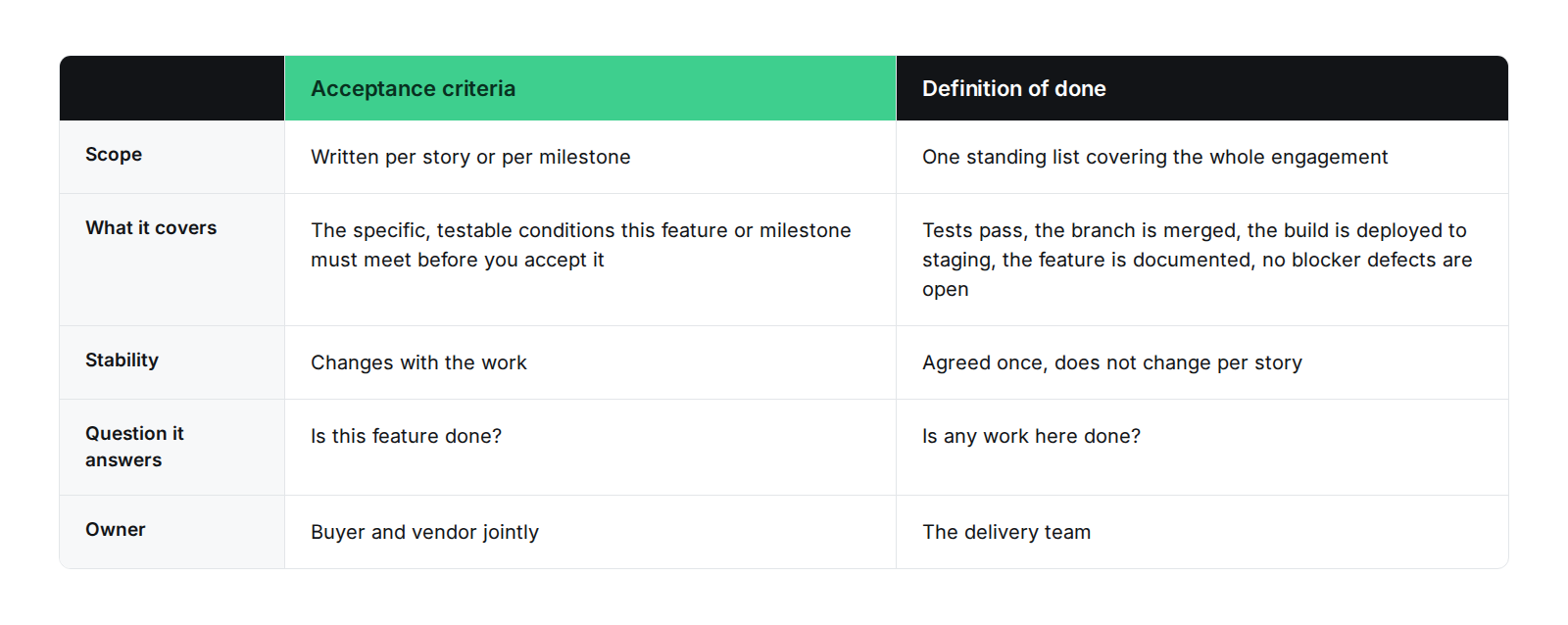
Acceptance criteria are the specific, testable conditions a feature or milestone must meet before you accept it.
A criterion does two jobs. It tells the engineer when to stop building and whoever tests it what to check. It also tells you what you're paying for, and that last one is why a criterion written in implementation language won't hold up in a contract. If accepting a milestone means reading a schema, it was written for the wrong person.
A definition of done is a different instrument. It's the standing quality bar for every piece of work in the engagement: tests pass, the branch is merged, the build is deployed to staging, the feature is documented, and no blocker defects are open. You agree it once and it doesn't change per story, and the delivery team owns it. Acceptance criteria are owned jointly, because you have to agree to them before either side can hold the other to them.
In agile practice the two get mixed up often enough that searches for acceptance criteria agile turn up both under the same heading. The cleanest way to separate acceptance criteria vs definition of done is by the question each one answers. Acceptance criteria answer "is this feature done." A definition of done answers "is any work here done." A team can hit its definition of done and still fail acceptance. Clean code that does the wrong thing is still the wrong thing.
Acceptance Criteria Examples in Three Formats
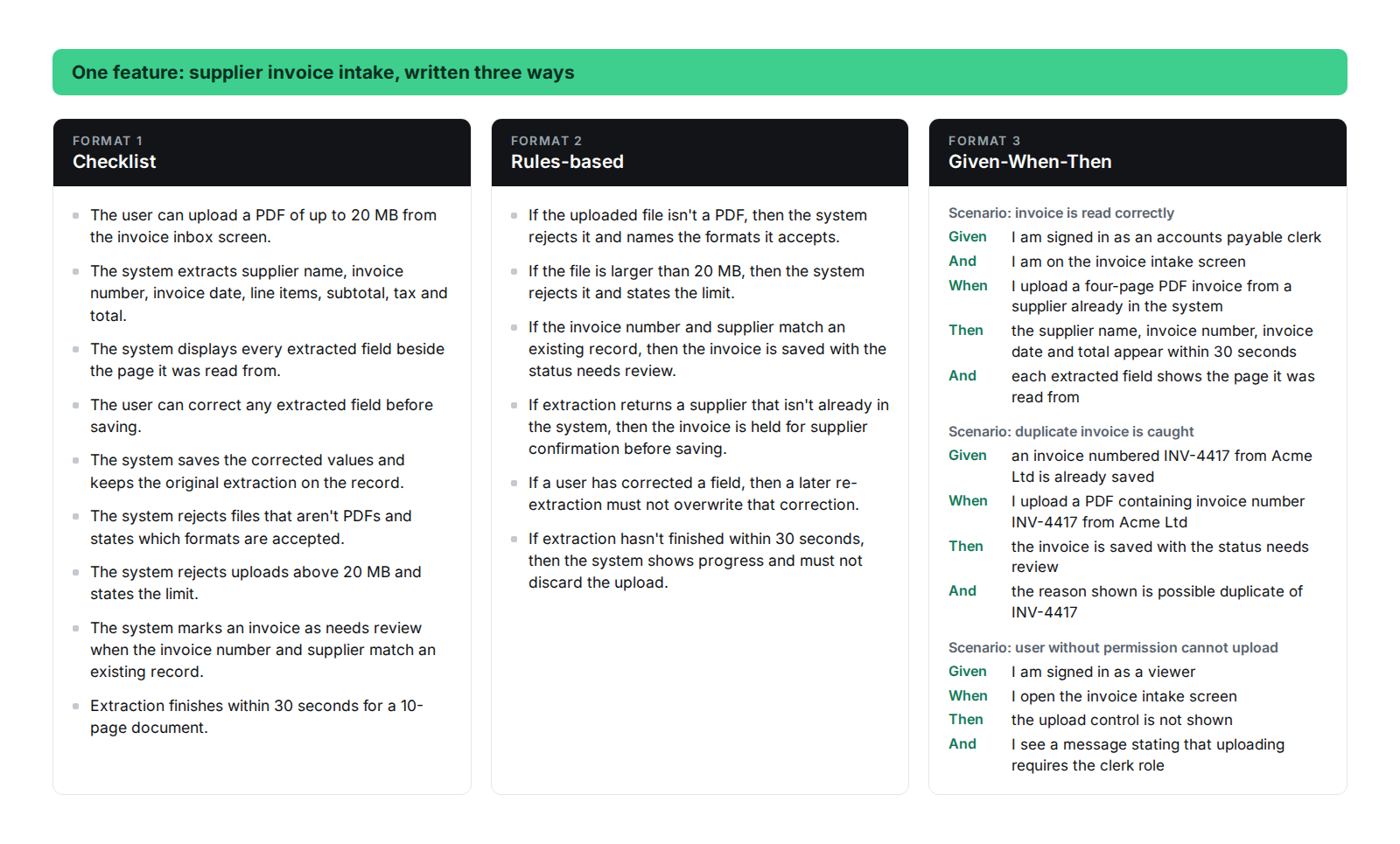
These formats cover almost everything you'll see: a checklist, a set of rules, and Given-When-Then scenarios. Any feature can be written in any of them. They're not equally good for every feature, and what usually decides it is whether the feature has branching logic.
The examples below all come from one product, a supplier invoice tool, so you can see how they connect when the stories roll up into milestones later.
Checklist Format Example
Feature: supplier invoice intake.
- The user can upload a PDF of up to 20 MB from the invoice inbox screen.
- The system extracts supplier name, invoice number, invoice date, line items, subtotal, tax and total.
- The system displays every extracted field beside the page it was read from.
- The user can correct any extracted field before saving.
- The system saves the corrected values and keeps the original extraction on the record.
- The system rejects files that aren't PDFs and states which formats are accepted.
- The system rejects uploads above 20 MB and states the limit.
- The system marks an invoice as needs review when the invoice number and supplier match an existing record.
- Extraction finishes within 30 seconds for a 10-page document.
The pattern to copy is the user can, the system does, the system rejects. A checklist fits features with many independent conditions and no branching, where each line passes or fails on its own.
Rules-Based Format Example
Feature: supplier invoice intake, the same one written as a checklist above.
- If the uploaded file isn't a PDF, then the system rejects it and names the formats it accepts.
- If the file is larger than 20 MB, then the system rejects it and states the limit.
- If the invoice number and supplier match an existing record, then the invoice is saved with the status needs review.
- If extraction returns a supplier that isn't already in the system, then the invoice is held for supplier confirmation before saving.
- If a user has corrected a field, then a later re-extraction must not overwrite that correction.
- If extraction hasn't finished within 30 seconds, then the system shows progress and must not discard the upload.
The last two are negative rules. Negative rules get left out of specs because a demo shows what a system does, not what it refuses to do, and they're the ones that cost money when they're missing.
A rules format fits business logic with thresholds, permissions or pricing tiers. The branching is the feature.
Given-When-Then (Gherkin) Format Examples
Given-When-Then came out of behavior-driven development. Martin Fowler credits Daniel Terhorst-North and Chris Matts with the approach, and it structures testing frameworks like Cucumber. For a buyer, the useful property is that a scenario written this way reads as a test and can be turned into an automated one. That's why it survives best as a contract exhibit.
Here are three given when then acceptance criteria examples for the same intake feature, including one failure path.
Scenario: invoice is read correctly
Given I am signed in as an accounts payable clerk
And I am on the invoice intake screen
When I upload a four-page PDF invoice from a supplier already in the system
Then the supplier name, invoice number, invoice date and total appear within 30 seconds
And each extracted field shows the page it was read from
Scenario: duplicate invoice is caught
Given an invoice numbered INV-4417 from Acme Ltd is already saved
When I upload a PDF containing invoice number INV-4417 from Acme Ltd
Then the invoice is saved with the status needs review
And the reason shown is possible duplicate of INV-4417
Scenario: user without permission cannot upload
Given I am signed in as a viewer
When I open the invoice intake screen
Then the upload control is not shown
And I see a message stating that uploading requires the clerk role
Three scenarios, three outcomes, all observable by clicking. None of them mentions a database, a queue or a library. That's the test to apply: if a line only makes sense to the person who built it, it can't settle a payment dispute.
User Story Examples With Acceptance Criteria, Mapped to Milestones
Stories say what someone wanted and why. The criteria attached to them are what gets tested, and the milestone those stories sit in is what gets paid.
Below are four user story examples with acceptance criteria attached, from the same supplier invoice tool, each labeled with the milestone it belongs to.
Milestone 1: user administration
As an operations manager, I want to search and deactivate users, so that people who leave lose access the same day.
- The user can search the user list by name or email and see results as they type.
- The user can deactivate an account from the results list in one action.
- A deactivated user is signed out of any active session within 60 seconds.
- A deactivated user can't sign in and sees a message telling them to contact their administrator.
- The user list shows who deactivated an account and when.
Milestone 2: intake and extraction
As an accounts payable clerk, I want uploaded invoices read automatically, so that I stop retyping figures from PDFs.
- All nine criteria from the checklist example above.
Milestone 3: approval workflow
As a finance lead, I want invoices of $1,000 or more to need two approvals, so that no single person can authorize a large payment.
- If the invoice total is under $1,000, then one approver can approve it.
- If the total is $1,000 or more, then two approvals from different users are required.
- If the approver is the same user who uploaded the invoice, then the system must not accept their approval.
- If the supplier is on the blocked list, then the invoice routes to finance review and can’t be approved.
- If an invoice has been approved, then its extracted fields must not be editable.
- If an approver rejects an invoice, then it returns to the uploader with the rejection reason recorded against it.
- The approval history for an invoice shows each approver and the time of each approval.
Milestone 4: payment and reconciliation
As a finance lead, I want an approved invoice paid through Stripe and marked paid, so that the ledger matches the bank.
- The user can trigger a payment on an approved invoice and on no other status.
- A successful test payment sets the invoice status to paid and records the Stripe payment reference.
- A failed payment leaves the status as approved and records the failure reason against the invoice.
- The invoice can't be paid twice, and a second attempt on a paid invoice is refused with a message.
- A payment recorded as paid appears in the export within one minute.
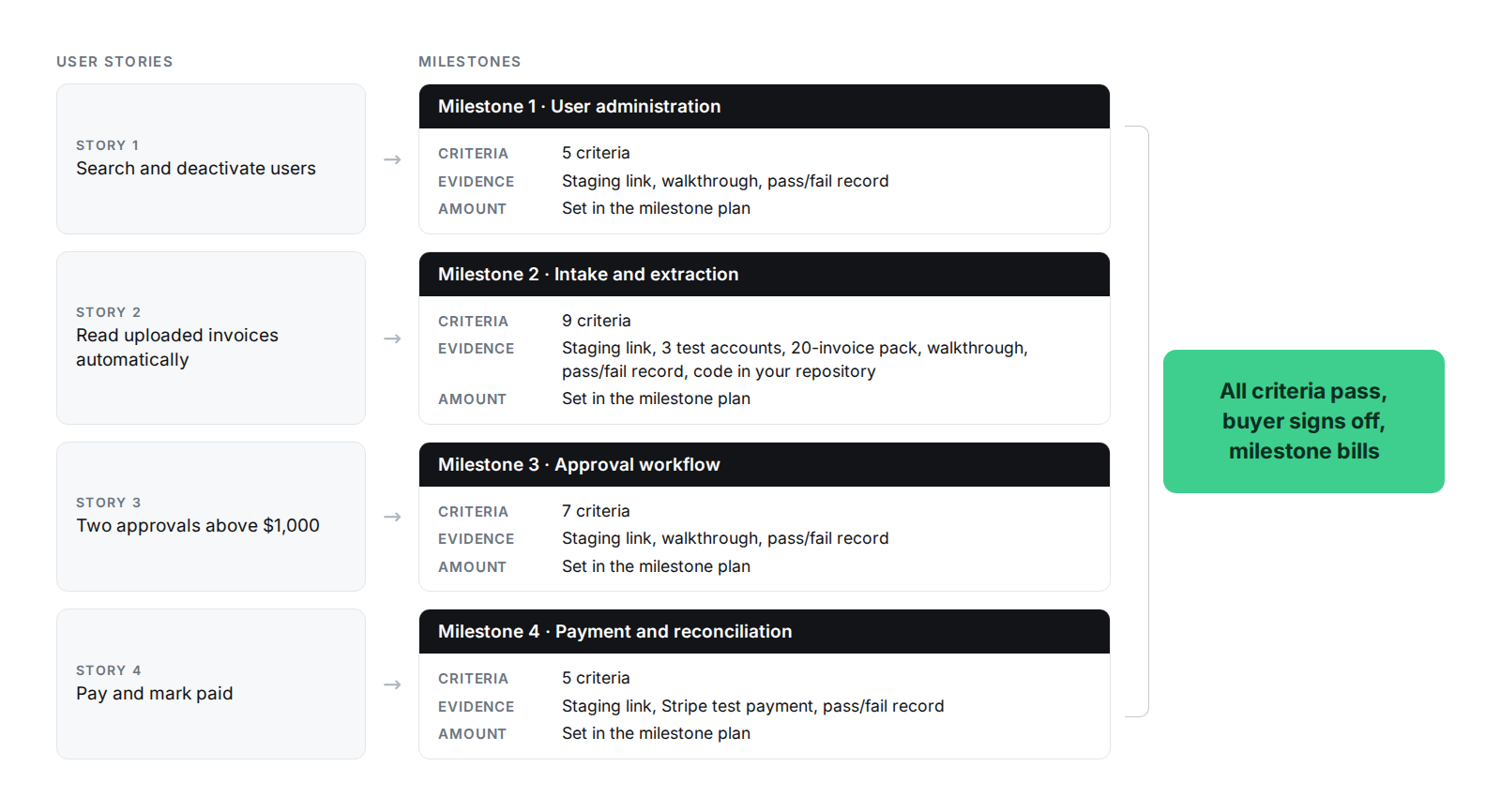
One rule holds up the rest of this guide. A milestone is accepted when every story inside it passes its criteria, and on no other basis. A good demo, a hard month and an arrival date are not acceptance.
Writing Acceptance Criteria for a Milestone, Not Just a Story
Most project acceptance criteria examples you'll find stop at the story. Story-level criteria tell you whether a feature works. They don't tell you who tests it, on which environment, with what data, by when, or what happens when one of them fails.
A payment decision needs all of that. So a milestone carries its own acceptance definition on top of the stories inside it.
Seven things belong in it, and they read as one page.
- It starts with scope, meaning what's in this milestone and what's explicitly out, because the out list prevents the acceptance argument about something nobody agreed to build.
- Then the acceptance criteria themselves, which are the stories in the milestone and their criteria as written above.
- After that comes the test method: who tests, on which environment, with which accounts and data. "The buyer tests on staging using the three supplied test accounts and the sample invoice pack" is a test method. "The client reviews the work" isn't.
- Alongside it sits the evidence required, which runs to a staging link, test credentials, a walkthrough of the criteria, a pass or fail record against each one, and the code committed to your repository. Evidence is what turns acceptance into something you could hand to a third party.
- The last three are the ones that get skipped and then argued about. The defect severity threshold says which defects block acceptance and which don't, and it's covered below.
- The review window is the number of business days you have to accept or reject after delivery, without which a milestone sits in limbo and neither side knows whether it's been accepted.
- And the rework rule says what happens on a fail: the vendor fixes the failed criteria at no extra charge, you retest, and the window restarts on the failed items only.
That's the exhibit to expect attached to each milestone of a milestone-based agreement. Our engagement models page contains a full example milestone schedule with the same fields. A milestone plan without these seven things is a payment structure wearing a technical name, and you find that out the first time a milestone is contested.
None of this is exclusive to milestone billing. Acceptance criteria improve a fixed price build, where they decide what the fixed price bought. They improve time and materials, where they give an open-ended engagement something to measure. Our comparison of pricing models covers where each one fits. Criteria carry the most weight under milestone billing because that's where they release money.
Milestone 2: intake and extraction
Field | Value |
|---|---|
In scope | PDF upload, field extraction, review and correction screen, duplicate detection |
Out of scope | Email ingestion, scanned image OCR, multi-currency conversion, supplier onboarding |
Acceptance criteria | The nine criteria in the checklist example above |
Test method | Buyer tests on staging using three supplied accounts (clerk, approver, viewer) and a 20-invoice sample pack provided by the vendor |
Evidence required | Staging link, test credentials, a recorded walkthrough of each criterion, a pass or fail record against all nine, code committed to the buyer's repository |
Defect severity threshold | Zero blocker or critical defects open. Majors logged with agreed fix dates. Minors don't block |
Review window | Five business days from delivery to accept or reject in writing |
Rework rule | Vendor fixes failed criteria at no extra charge. Buyer retests. The window restarts on the failed items only |
Billing amount | Set in the milestone plan. Bills on written sign-off |
Defect Severity: What Blocks a Payment and What Does Not
Agreeing severity levels before the build turns a bug argument into a lookup.
Severity | Definition | Effect on acceptance |
|---|---|---|
Blocker | The milestone's main workflow can't be completed at all | Blocks acceptance |
Critical | An acceptance criterion fails, or data is lost, corrupted or exposed, and there's no workaround | Blocks acceptance |
Major | A criterion passes only with a workaround, or a secondary path fails | Doesn't block. Logged with an agreed fix date |
Minor | Cosmetic, wording or layout issue with no effect on any criterion | Doesn't block. Goes to the backlog |
A sensible default: zero blocker or critical defects at acceptance, majors logged with agreed fix dates, minors never block a payment.
Write the four definitions into the agreement alongside the threshold. The argument you're preventing is about which column a bug goes in, and it's far cheaper to have that argument before the build than during a contested invoice.
Where the Criteria Come From: Scope Them Before the First Milestone Is Priced
Criteria written after the build starts get written by whoever has the most leverage at that moment. If the vendor is mid-sprint and over budget, the criteria soften. If you're unhappy and holding an invoice, they harden. Neither version describes the product anyone agreed to.
They belong in a paid scoping phase, before the first milestone is priced. A milestone can't be priced accurately until the thing that defines "done" for it exists.
Sprint 0 is a fixed-fee, fixed-scope discovery sprint of $5,000 to $15,000 over two to four weeks. It produces the UI/UX design and design system, epics and user stories with acceptance criteria, a billable milestone plan with every milestone defined and priced, and the technical architecture with repository scaffolding. A go-or-no-go decision follows Sprint 0 and precedes Sprint 1, and either side can decline.
If you want the mechanics of that phase on its own, we broke down what Sprint 0 costs and delivers separately. The shape is what to look for, not the vendor. Any discovery phase you pay for should end with criteria attached to priced milestones, whoever runs it. One that ends with a slide deck has left the question of what counts as done until the point where you have the least leverage to settle it.
How to Test a Deliverable as a Non-Technical Buyer
You don't need to read code to accept a milestone. You need a staging link, test accounts, the criteria list and an afternoon.
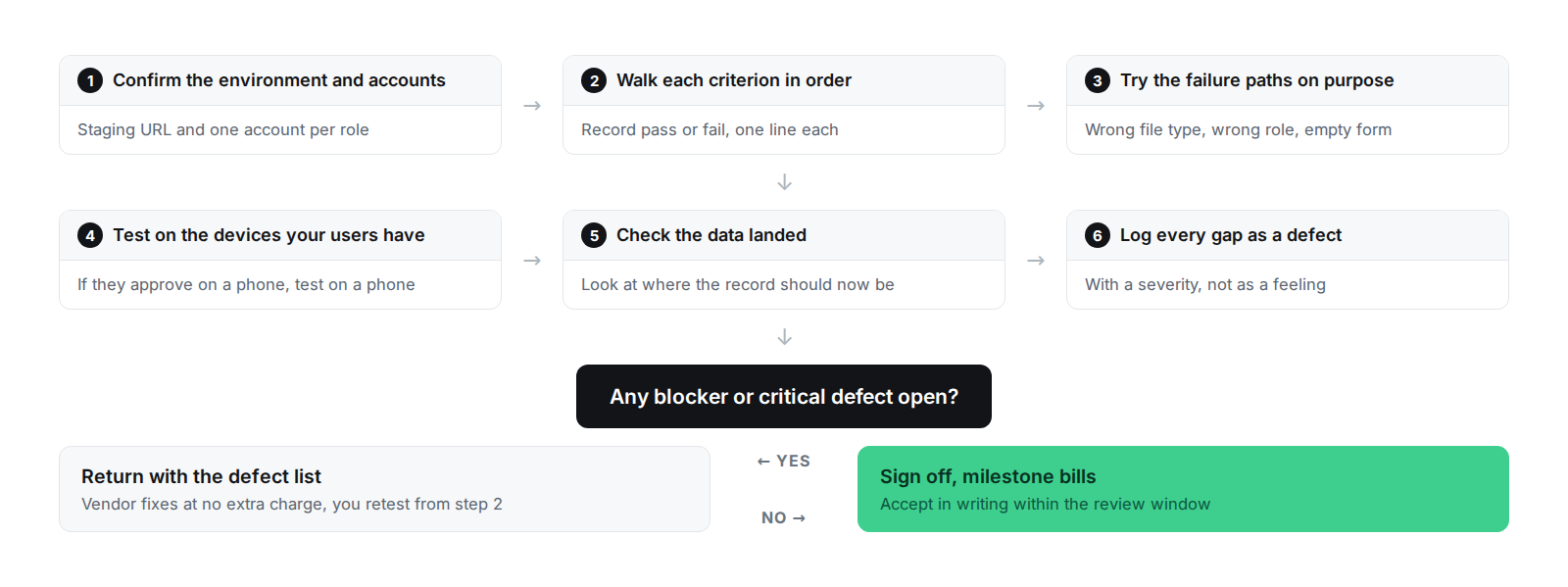
The user acceptance testing checklist below runs against a milestone in the order the steps have to happen.
- Confirm the environment and accounts. Get the staging URL and one account per role. Testing the wrong environment wastes an afternoon, and it's easy to do when a vendor has several running.
- Walk each criterion in order and record pass or fail. One line per criterion, no commentary in between. A criterion you can't test was written badly, and it goes back.
- Try the failure paths on purpose. Upload the wrong file type. Sign in as the role that shouldn't have access. Submit the empty form. The happy path is what got demoed, so untested behavior tends to sit here.
- Test on the devices your users have. If half your team approves invoices on a phone, test on a phone.
- Check the data landed. After each action, look at where the record should now be. A screen that says saved and a record that saved are different claims.
- Write every gap as a defect with a severity, using the four levels above. "This feels clunky" can't be actioned or argued. "Criterion 6 fails, non-PDF upload is accepted, critical" can.
That's how to do user acceptance testing as the person signing the check. The vendor supplies the walkthrough and the test data. If a vendor can't produce either, ask why before you approve the milestone, not after.
Acceptance Criteria for AI Features
A feature whose output is probabilistic breaks the pattern. An extraction model, a classifier or an agent that drafts a reply can't be accepted against "the answer is correct," because it'll be correct most of the time and the interesting question is what happens the rest of the time.
NIST's AI Risk Management Framework puts the MEASURE function at the center of this, using quantitative and qualitative methods to benchmark AI systems, and states that AI systems should be tested before deployment and regularly while in operation. Acceptance criteria for an AI feature are how you get that in writing.
Five things replace "it works."
An agreed evaluation set. A fixed collection of real examples, assembled before the build and held by both sides. The set has to be big enough that one odd document can't move the pass rate, and it grows as you find cases the feature gets wrong.
A pass-rate threshold on that set. A number agreed in advance and measured against the fixed set, not against whatever the demo happened to use.
A maximum latency and cost per request. Ask for the 95th percentile, not the average. The average hides the slow tail that users notice.
A human-review sampling rule for production. What percentage of live outputs a person checks after launch, and who does the reviewing. Agree the percentage during scoping and write it into the milestone.
An explicit refusal and escalation list. The inputs the feature has to decline or route to a human. This is the criterion that keeps a confident wrong answer from reaching a customer.
Written in Given-When-Then, for the extraction feature, with illustrative numbers:
Given the agreed evaluation set of 200 supplier invoices
When the extraction feature is run across the full set
Then at least 95 percent of invoices have supplier name, invoice number, date and total extracted correctly
And the 95th percentile extraction time is under 30 seconds per document
And every invoice scoring below the confidence threshold is flagged for human review instead of being saved automatically
Those numbers are illustrative. The set size, the threshold and the latency belong to your product and get set during scoping.
One question to ask any vendor quoting a pass rate: what graded it. If another model graded the output, it should come from a different model family than the one being tested, because same-family judges score their own relatives generously. The grader itself should have been checked against human-reviewed examples before anyone trusted its scores. A pass rate with no stated grading method is a number, and a number isn't a criterion.
That's how we write acceptance criteria for AI features in our software product development work. The evaluation set and the thresholds get agreed during scoping and written into the milestone that delivers the feature, so the number is fixed before anyone has an interest in what it says.
Acceptance Criteria Checklist
Run every criterion you're given against this acceptance criteria checklist. Each line stands alone.
- It's specific enough that two people reading it expect the same behavior.
- It's testable by clicking, not by reading code.
- It's binary. It passes or it fails, with no partial credit.
- It's written from the user's side of the screen.
- It contains no implementation detail, no library names, no table names.
- It carries a real number wherever a limit, a duration or a count applies.
- It was agreed before the work started, not after the work was delivered.
- It belongs to a named story, and that story belongs to a named milestone.
And four more at milestone level, which is where the payment decision lives.
- The test method names who tests, on which environment, with which accounts and data.
- The evidence required is listed, including the staging link, the walkthrough and the pass or fail record.
- The review window is a stated number of business days.
- The rework rule says what happens on a fail and who pays for the fix.
That's also the answer to how to write acceptance criteria for user stories that survive a contested invoice. Everything on the list is checkable by someone who wasn't in the room when it was written, which is the point.
Final Thoughts
Acceptance criteria are what turn a milestone-based agreement from a promise into a mechanism. They have to be written before the build, priced into the milestone they belong to, and tested by you instead of described by the vendor.
The test of a good exhibit is that you could hand it to someone who's never met either party, and they could tell you whether the milestone passed.
If you have a proposal in front of you and want a second read on whether its milestones are testable, send it over. Happy to look at it with you, including when the answer is that the proposal's fine and you should sign it.
Frequently Asked Questions
What are the main formats for acceptance criteria?
Checklist, rules-based and Given-When-Then. A checklist fits features with many independent conditions and no branching, while rules fit business logic with thresholds, permissions or pricing tiers. Given-When-Then fits anything with a sequence and a state, and it reads as a test, which makes it the most useful format in a contract exhibit.
What is the difference between acceptance criteria and a definition of done?
Acceptance criteria are the conditions a specific story or milestone must meet, and they change with each piece of work. A definition of done is the standing quality bar that applies to everything in the engagement, like tests passing, deployment to staging, documentation, and no open blocker defects. Work can meet the definition of done and still fail acceptance.
Can you give an example of a user story with acceptance criteria?
As a supplier, I want to see the status of my submitted invoice, so that I stop emailing accounts payable to ask. Criteria: the supplier can sign in and see every invoice they submitted with its current status; each invoice shows the date it changed to that status; an invoice rejected by an approver shows the rejection reason recorded by that approver.
What is a Given-When-Then example?
Given I am signed in as a viewer / When I open the invoice intake screen / Then the upload control is not shown. The format is useful in a contract because it reads as a test. Anyone can run it by clicking, both sides agree in advance what passing looks like, and a developer can turn the same three lines into an automated check.
Who writes the acceptance criteria in a milestone-based software contract?
The vendor drafts them from your requirements during the scoping phase, you approve them, and both sides sign them before the milestone is priced. A vendor who won't write criteria down before the build is telling you how the build will go, and how the first contested invoice will go with it.
What happens when a milestone fails acceptance?
The vendor fixes the failed criteria at no extra charge, you retest, and the milestone bills on sign-off. Scope you add during testing is a new milestone with its own criteria and its own price, and it isn't grounds for withholding payment on the current one. Keep those two things separate in writing before testing starts.