RFQ Automation for Job Shops and MGAs: How AI Agents Replace Manual Quoting
A job shop quoting 80 RFQs a week and an MGA processing 800 submissions a month are running the same operation under different names. In both, a skilled person reads a document, applies rules and judgment, produces a quote, and re-types it into a system of record.
The work is repetitive, it scales linearly with volume, and it consumes the time of exactly the people who should be handling the hard cases instead. RFQ automation moves the reading, extraction, and data entry to an agent and leaves the judgment with the human, which is where it belongs.
This guide maps both workflows at the same level of detail, names the real systems involved (JobBOSS, Epicor, EZLynx, Applied Epic, and the carrier portals that make MGA integration hard), works through the payback math for each, and is honest about where the integrations break. If you run one of these operations and you are weighing a build, you should finish with enough to know whether the numbers work for you.
Why Manual Quoting Breaks at Scale
The pressure point looks different in each vertical, but the cause is identical: a person produces every quote by hand, and throughput is limited by how many documents that person can read and process in a day.
In a job shop, an estimator opens the RFQ email, pulls the drawing, reads dimensions and tolerances and finish callouts, models the cost across material and operations, and enters the quote into an ERP like JobBOSS or Epicor, often with a spreadsheet running alongside the system for the parts the ERP does not handle cleanly. A shop quoting 80 RFQs a week at 45 to 90 minutes each is spending 60 to 120 estimator hours a week just producing quotes.
In an MGA, an underwriter or CSR opens the submission, reads the ACORD forms, checks the risk against carrier eligibility rules, compares options across carrier portals, and re-enters the selected quote into an AMS like EZLynx or Applied Epic. An MGA handling 800 submissions a month at 20 to 40 minutes each is spending 265 to 530 staff hours a month on the same kind of work.
Both numbers describe a throughput constraint you cannot hire your way out of cheaply, because every additional unit of volume needs another fraction of a skilled person. The real question is: what would it take for the quote to be produced automatically, with the estimator or underwriter reviewing it instead of building it from scratch?
The Two Workflows That Break Differently
The two operations are similar, but they run into problems at different points. Those differences matter because they shape what an agent can realistically automate, what it can assist with, and where a human still needs to stay involved.
Drawing-to-Quote at a Job Shop
The manufacturing quoting workflow usually moves through five steps: RFQ intake (the request arrives by email with a drawing attached), drawing review (the estimator reads the geometry, dimensions, tolerances, material spec, and finish), process planning (the estimator works out the required operations), cost modeling (they estimate material, machine time, labor, setup, and outside processing), and quote and ERP entry.
Most shops spread this work across email, drawing files, the ERP quote record, and often a spreadsheet where the estimator handles cost modeling the ERP does not support cleanly.
The process usually strains in two places. First, assumptions about setup, tooling, sequencing, and process often live only in the estimator's head and are never captured. Second, manual ERP entry slows the process down and creates room for transcription errors.
An agent can help interpret the RFQ, organize extracted information, support cost modeling, and move data into the ERP. But it should not be positioned as a full replacement for estimator judgment where that judgment is genuinely required. For context on how this fits into a broader automation stack, see our piece on AI for inventory and supply chain automation, which covers adjacent workflows in the same operational environment.
Submission-to-Quote at an MGA
The MGA quoting workflow runs from submission intake through ACORD data extraction, carrier eligibility checks, quote generation, and AMS entry. A submission arrives, usually by email, with ACORD forms attached, commonly the ACORD 125 and 126 for commercial lines. The CSR or underwriter reads the forms, extracts the risk data, checks it against each carrier's eligibility and appetite rules, compares quotes across carrier portals, selects an option, and re-enters it into the AMS.
Most workflows span email, the ACORD forms, an AMS platform like EZLynx, Applied Epic, or HawkSoft, and the carrier portals. The process breaks in two predictable places: ACORD forms arrive incomplete, forcing manual follow-up with the broker before anything can proceed; and the underwriter manually compares carrier portals then re-enters the selected quote into the AMS, which is slow and error-prone.
The hardest part to automate is the carrier portal and rate-filing layer, because many carriers still expose no API at all, which leaves browser automation or a manual handoff as the only paths.
What an AI Agent Actually Does in Each Case
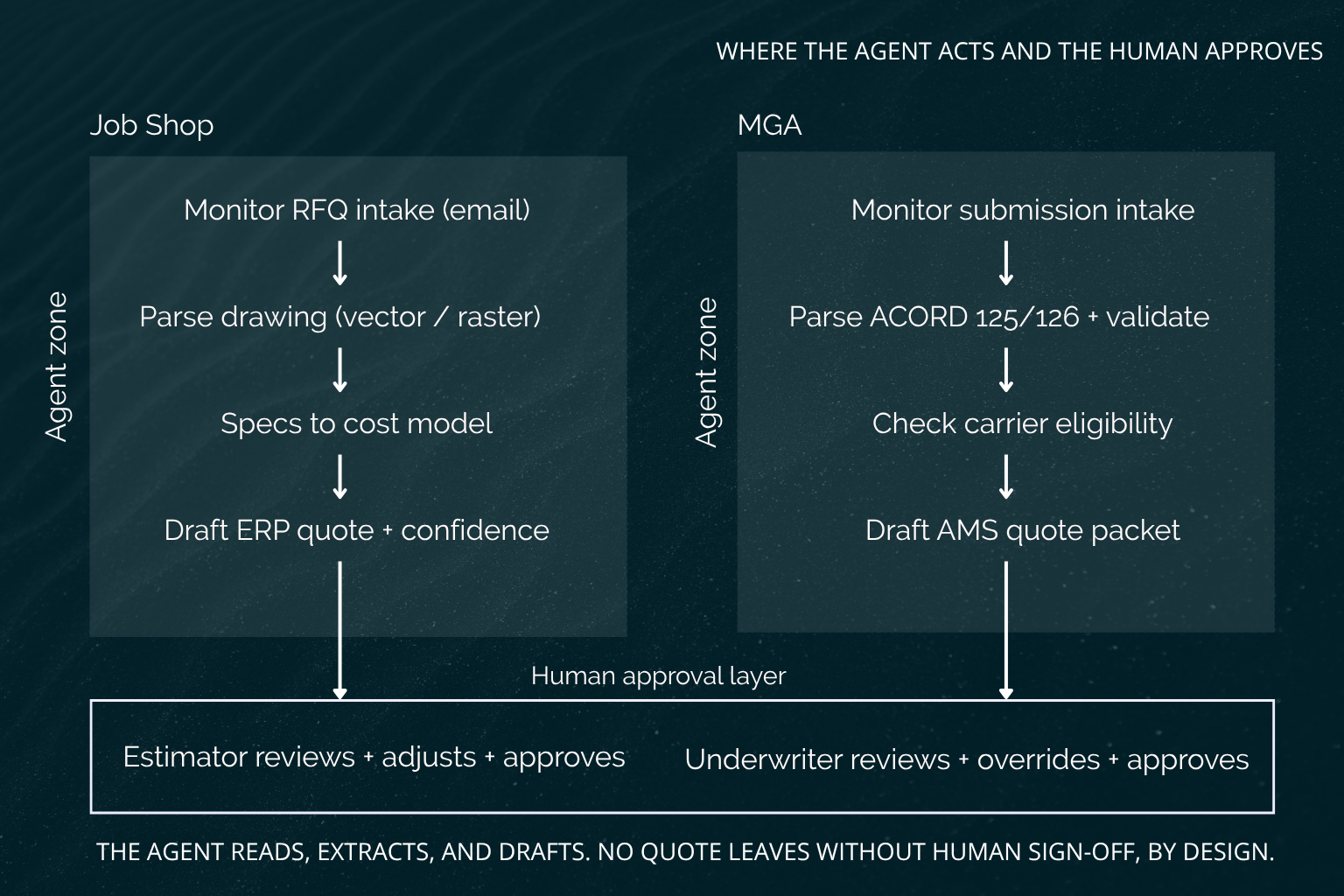
In both workflows, the agent occupies the same position: it handles reading, extraction, and data entry, and it stops at the approval layer where a human reviews and approves the final quote.
In manufacturing, the agent monitors RFQ intake, parses the drawing through document extraction or vision-based analysis, pulls out the specs and operations, runs them against a cost model, generates a quote, and creates a draft ERP record. In an MGA, the agent monitors incoming submissions, parses the ACORD forms, validates completeness, checks the risk against carrier eligibility rules, generates a pre-filled quote packet, and creates a draft AMS record.
The shape is the same in both: the agent does the document work and the data work, and the estimator or underwriter does the judgment work and the sign-off. For a deeper look at how multi-step agent logic is structured across workflows like these, see AI agent orchestration.
How the Agent Reads a Drawing vs. an ACORD Form
The document-parsing step is where the two workflows diverge most, because a mechanical drawing and an insurance form are different kinds of documents with different failure modes.
For manufacturing drawings, the critical distinction is between PDFs with embedded vector geometry and scanned raster drawings. When the drawing is a vector PDF, the dimensions, tolerances, and geometry can be extracted directly from the file with high reliability. When the drawing is a scanned raster image, the agent has to fall back on vision-based parsing, and accuracy drops because it is reading pixels rather than geometry. Plenty of older job shops still work from scanned drawings, so escalation thresholds for raster inputs are set stricter: more of those quotes route to a human because the extraction confidence is lower.
For ACORD forms, the 125 and 126 are semi-structured PDFs with standardized layouts, which helps, but they carry inconsistent handwritten notes and broker annotations that do not follow any standard. The extraction layer reads the standardized fields, validates that the required ones are present, and flags missing or ambiguous data before eligibility matching begins, so the agent is not running carrier checks against an incomplete risk picture.
Where the Agent Writes Back
The write-back step is where the agent's work lands in the system of record, and in both cases it lands as a draft, never as a sent quote.
In manufacturing, the agent creates a draft ERP quote populated with the extracted specs, the estimated costs, and a confidence score, and the estimator reviews and adjusts it before approving. In an MGA, the agent creates a draft AMS submission with the extracted risk data, the carrier recommendations, and pre-filled quote fields, and the underwriter reviews and overrides where needed.
In neither workflow does the agent send a quote without human approval, and that is a design decision rather than a technical limitation. The point of the system is to give the expert a finished draft to check, not to take the expert out of the loop.
The Integration Layer Is the Hard Part
The agent logic is the tractable part of these builds. Getting data in and out of ERPs and AMS platforms and carrier portals that were never designed for it is where the real implementation work lives, and it varies enough by platform that it has to be assessed before anyone can quote a build cost.
In manufacturing, many job-shop ERPs have limited API support. JobBOSS, for instance, has no native API, so integration depends on database access, screen scraping, or vendor-managed exports, and the available path changes with the ERP version and how the shop has configured it. For a broader look at what modern AI-ERP integration looks like, see AI-augmented ERP systems.
In MGAs, EZLynx offers API access for policy and submission data, but most carrier portals still run on browser-based workflows with little or no API coverage, which forces browser automation or a manual handoff for the carrier-facing steps. These are not edge cases to wave away. They are the substance of the work.
ERP Integration Depth by Platform
A short, honest inventory of the common job-shop ERPs and how accessible each one is:
ERP | Integration path | Notes |
JobBOSS | SQL Server back end, accessible with database credentials | No native API |
Epicor | REST API in modern versions | Limited in older on-premise deployments |
Global Shop | ODBC or flat-file export | Older architecture, no modern API layer |
ProShop | Modern API | The most integration-friendly in this segment |
The integration path is not a detail you can assume. It is the reason a discovery phase exists: part of what discovery does is determine which path a specific shop's ERP and configuration require, before the build is scoped and priced. A shop on ProShop and a shop on Global Shop are quoting very different builds even if their quoting workflows look identical on the surface.
AMS and Carrier Portal Integration Depth
The MGA stack has the same variation, plus one constraint that dominates everything else:
System | Integration path | Notes |
EZLynx | API available | Covers policy and submission data, not real-time carrier rating |
Applied Epic | API via Applied's developer program | More accessible for larger MGAs |
HawkSoft | Limited API | Often requires file export |
Carrier portals | Essentially no API access | Browser automation is the practical path |
The carrier portal constraint is the single most important thing to be honest about in an MGA build. Across the major admitted and E&S carriers, there is essentially no API access, so interacting with carrier portals means browser automation, and browser automation is fragile relative to API integration. A portal UI change can break it, which means the carrier-facing layer needs monitoring and maintenance that an API integration would not. Any MGA evaluating this should go in expecting that the carrier portal layer is the part most likely to need ongoing attention.
Build vs. Buy vs. Wait: The Three Options in 2025
A custom build is not the only path, and it is not always the right one.
In manufacturing, tools like Paperless Parts and CADDi offer faster implementation and pre-built estimating models. They work best in standardized quoting environments and tend to come with limited ERP integration, so they fit shops whose quoting is relatively uniform and whose ERP either plays well with them or is not central to the workflow. In MGAs, tools like Indio, Zywave, and EZLynx's own features handle submission tracking and partial document parsing, but carrier matching and AMS write-back still lean heavily on manual work, so they reduce the load without closing the loop.
Waiting is also a legitimate choice. If your quoting volume is low enough that the recovered labor will not pay back a custom build in a reasonable window, the right move is to wait until volume grows or to use a packaged tool in the meantime. The decision is driven by volume and integration complexity, not by whether automation is theoretically possible.
How to Know If the Math Works Before You Build
The build decision comes down to a labor calculation you can run on your own numbers. Take your volume, multiply by the time per unit to get total hours, multiply by the fully loaded hourly cost to get the labor spend, then estimate how much of that an agent recovers at a realistic autonomy rate. The implementation and managed-service cost should pay back against the recovered labor within four to six months.
The Manufacturing Math
The variables for a job shop are weekly RFQ volume, average estimator minutes per quote, fully loaded estimator hourly cost, and the agent autonomy rate (the share of quotes the agent handles without escalating to a human).
Formula: (weekly volume x minutes per quote / 60) x autonomy rate = weekly hours freed, then x hourly cost = weekly labor recovered.
Populated with representative numbers: 80 quotes per week at 60 minutes each equals 80 estimator hours weekly. At $100 per hour fully loaded, that is $8,000 in weekly quoting labor. At a 70% autonomy rate, 56 hours are freed each week, recovering $5,600. Against a setup fee in the high teens of thousands and a monthly managed-service fee in the low three-thousands, $5,600 per week in recovered labor pays back the setup in roughly four months, after which the monthly fee runs well under the labor it offsets.
The MGA Math
The variables for an MGA are monthly submission volume, average CSR or underwriter minutes per submission, fully loaded hourly cost, and the agent autonomy rate.
Formula: (monthly volume x minutes per submission / 60) x autonomy rate = monthly hours freed, then x hourly cost = monthly labor recovered.
Populated with representative numbers: 800 submissions per month at 30 minutes each equals 400 staff hours monthly. At $65 per hour fully loaded, that is $26,000 in monthly quoting labor. At a 65% autonomy rate, 260 hours are freed each month, recovering $16,900. The MGA autonomy rate sits a little lower than the manufacturing example because the carrier portal layer forces more human handoffs. That is the honest version of the number, not the optimistic one.
What the Transition Actually Looks Like
A realistic implementation runs in a sequence, and the early part of it is slower than the manual process, which is worth knowing before you start.
First, baseline the current state: quoting time per unit, volume, and error rates, so there is a real number to measure against later. Second, identify which quote types are automatable and which are permanently human-driven, because not every RFQ or submission should route through the agent. Third, build the agent around that scope. Fourth, run agent-generated drafts in parallel against human-produced quotes, comparing the two without acting on the agent's output yet, so the team can see where it is right and where it needs tuning. Fifth, go live with escalation rules that route edge cases to humans.
The honest expectation is that the first one to two months are often slower than the manual process, because the agent needs calibration and the review step needs tuning before throughput actually improves. Teams that expect an immediate speedup get frustrated in month one; teams that expect a calibration period get the throughput gain in month three and after.
Deployment Considerations for Job Shops and MGAs
- Three operational concerns come up in almost every deployment.
- Manufacturing drawings and ACORD submissions both contain sensitive information. Drawings can include customer IP; submissions include personal and business risk data. These builds often require private deployments, strict data-processing agreements, or clear controls around where data is stored and processed.
- Accuracy should be managed with confidence thresholds. When the agent's confidence on an extraction, classification, or quote recommendation falls below the set level, the case should route to a human instead of moving forward automatically.
- User trust is often the hardest part. Estimators and underwriters need to trust the agent enough to review its output rather than redo the work from scratch. That is why the parallel-run phase matters. When the expert sees the agent produce reliable drafts over a few weeks, the review step starts to become a real review instead of a quiet re-do.
Final Thoughts
In both manufacturing and MGA workflows, the quoting problem is usually less about replacing judgment and more about removing the manual work around it. The estimator's real expertise is in process decisions and edge cases. The underwriter's real expertise is in risk assessment and exceptions. But much of the time each person spends on a quote goes to reading documents, extracting information, and entering data into systems, which is exactly the kind of work an agent can support well.
The agent handles intake, extraction, validation, and draft creation. The expert keeps the review, the exceptions, and the final approval. The goal is not to replace the estimator or the underwriter. It is to give them back the hours they currently spend on repetitive operational work, so their judgment is focused on the cases that actually need it.
If you want to understand whether this makes sense for your specific operation, including which integration path your ERP or AMS requires and what level of automation is realistic for your document mix, book a 30-minute call with the Leanware engineering team.
Frequently Asked Questions
Is my specific ERP or AMS supported, and what happens if it is not on your list?
The common platforms (JobBOSS, Epicor, Global Shop, and ProShop on the manufacturing side; EZLynx, Applied Epic, and HawkSoft on the MGA side) all have a known integration path, though the path differs by platform and version. If your system is not on that list, it does not mean a build is off the table; it means the discovery phase has to assess how data gets in and out before the build is scoped. The integration path depends on whether your system exposes an API, a database connection, or only a file export, and that assessment is part of what discovery determines.
What does the agent do when it cannot read a drawing or parse an ACORD field with enough confidence?
It escalates to a human rather than guessing. Every extraction carries a confidence score, and when that score falls below a configurable threshold, the case routes to your estimator or underwriter for manual handling instead of proceeding into the quote. Scanned raster drawings and ACORD forms with heavy handwritten annotations are the most common triggers for escalation, because both lower extraction confidence. You set the threshold, so you control how conservative the agent is about what it handles versus what it hands back.
How long does implementation take from signed agreement to go-live?
Plan for the first one to two months to include baselining, scoping which quote types are automatable, building the agent, and running its drafts in parallel against human quotes before going live. The parallel-run phase is not optional padding; it is how the agent gets calibrated and how your team builds trust in its output. The exact timeline depends on your integration path, since an API-accessible system like ProShop or EZLynx moves faster than one requiring database access or browser automation. Expect throughput gains from around month three, not week one.
Does my estimator or underwriter need to change how they work once the agent is live?
Their role shifts from producing quotes to reviewing them, which is a real change but a smaller one than it sounds. Instead of reading a document and building the quote from scratch, they open a draft the agent has already populated, check the extracted data and the cost or carrier logic, adjust what needs adjusting, and approve. The judgment work they are good at stays with them; the reading and typing moves to the agent. Most of the adjustment period is about trust rather than mechanics, which is why the parallel run matters.
How do I update the agent's quoting criteria when my pricing model or carrier appetite changes?
Quoting logic is maintained as configuration, so a change to your cost model, margin targets, or carrier appetite is a configuration update rather than a rebuild. In a managed engagement, the Leanware team handles those updates. The carrier portal layer needs the most ongoing attention, because portal UI changes can break browser automation and require maintenance independent of your own criteria changes.