AI Integration Services: Consulting, Costs & How to Integrate AI Into Existing Apps
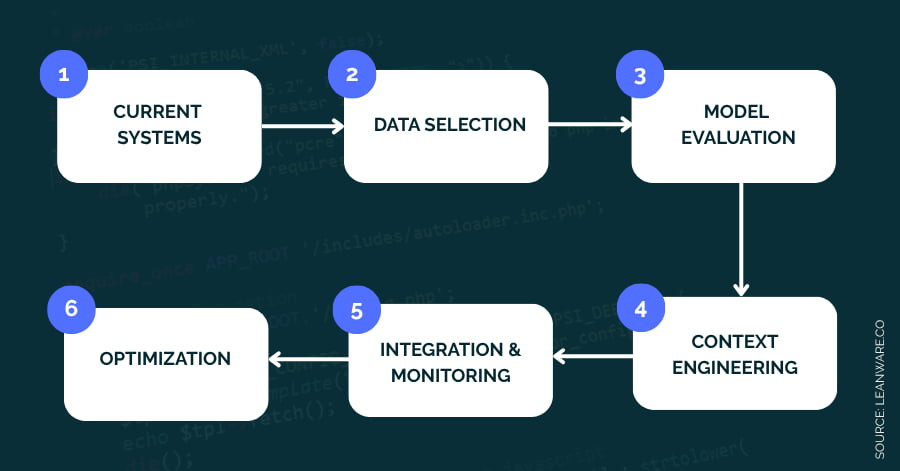
In 2024, 78% of companies reported using AI, and 71% said they had adopted generative AI in some form. In most of those companies, though, the use is still limited to isolated tools or early experiments. Getting AI wired into the systems your business actually runs on is a different problem, and it involves more than choosing a model or calling an API. Data infrastructure, system design, performance, compliance, and long-term maintenance all come into play.
If you are reading this, you are probably working on one of three jobs: integrating AI (including generative AI) into an application you already run, deciding whether to bring in an AI integration consultant, or budgeting the work. This guide covers all three, plus the strategy framework, the pitfalls that stall most projects between pilot and production, and a single consistent view of what integration costs in 2026.
Key Takeaways
- According to McKinsey, businesses that integrate AI effectively can boost profitability by up to 20% through automation, personalization, and better decision-making.
- You can add AI, including generative AI, to an existing application without rebuilding it. Most teams start with managed model APIs and expand from there.
- AI integration improves operational efficiency by automating repetitive work, sharpens decisions with real-time analysis, and personalizes the customer experience across touchpoints.
- Costs are tiered, not one number: a small API-based feature in an existing app starts around $5,000, while full-scale enterprise deployments run into the millions. The full breakdown is in the costs section below.
What Is AI Integration in Business?
AI integration is the process of incorporating AI technologies, such as machine learning, natural language processing, generative models, and predictive analytics, into your business operations and the software that runs them. The goal is measurable improvement in efficiency, accuracy, and return on investment, not AI for its own sake.
Defining AI Integration Services
AI integration services embed AI systems into daily workflows: automating repetitive tasks, optimizing how resources get used, and putting data-driven decisions where the work happens. That can mean automating customer service, supply chain management, HR processes, or personalized marketing. The point is rarely to replace people. It is to extend what your team can do by pairing them with systems that handle the volume and the routine.
Benefits: Efficiency, Accuracy, and ROI
- Efficiency: Routine and manual tasks get automated, reducing operational costs and freeing people for higher-value work.
- Accuracy: Advanced models reduce error rates in analysis and decision-making.
- ROI: Optimized processes and smarter planning show up in the numbers.
- Innovation: New product capabilities and personalized customer experiences become feasible.
- Scalability: Solutions proven in one department can be extended across the organization as confidence grows.
Core Technologies Powering AI Integration
Three foundational technology families drive most business AI integrations.
Machine Learning and Deep Learning
Machine learning lets systems learn from data and improve over time without explicit programming. Deep learning, a subset of ML, uses layered neural networks to model complex patterns, powering everything from predictive analytics to autonomous decision-making. In practice these technologies surface hidden insights, automate complex tasks, and keep improving as new data flows in.
Natural Language Processing and Generative AI
Natural language processing equips systems to understand, interpret, and generate human language. It powers chatbots, virtual assistants, sentiment analysis, and content automation. Generative language models have made this the fastest-growing integration category, and also the one that most needs guardrails: unreviewed model output can be confidently wrong, which is why output review belongs in the plan from day one (more on that in the pitfalls section).
Computer Vision
Computer vision lets machines interpret images and video. It drives quality control, security monitoring, and automated inspection, identifying defects, anomalies, or safety risks with high precision.
Key Business Use Cases

IT and DevOps Optimization
AI automates routine operations work such as system monitoring, anomaly detection, and predictive maintenance. It also accelerates development cycles through AI-assisted coding, testing, and deployment.
Sales and Marketing Automation
AI segments audiences, recommends products, and tailors messaging in real time from customer data. Generative AI drafts targeted ad copy, email content, and social posts, lifting engagement and conversion rates.
Customer Service and Chatbots
AI-powered chatbots and virtual assistants handle inquiries around the clock, troubleshoot common issues, and guide users through complex processes with context-aware interactions, cutting support costs while improving response times.
Content Generation and Personalization
AI personalizes what each user sees by analyzing behavior, preferences, and demographics: product recommendations, dynamic site content, adaptive learning materials, customized campaigns. It also automates content production at scale while keeping brand consistency.
Cybersecurity and Fraud Detection
Models analyze network and transaction data in real time to spot anomalies and threat patterns, enabling proactive defense and reducing fraud exposure.
Supply Chain and Inventory Management
AI forecasts demand, manages inventory levels, automates procurement, optimizes routes, and predicts equipment maintenance needs, producing direct cost savings.
Strategic Framework for Implementation
Laying the Foundation: Data, Tools, Team
Data. Clean, accurate, well-structured data comes first. Establish governance policies, centralize repositories so AI tools can actually reach the data, and put security controls around anything sensitive.
Tools. Select platforms that match the business need and integrate with your existing infrastructure, whether that is model APIs, ML frameworks, or cloud AI services. Prefer tools that can grow with the initiative.
Team. Combine engineers, data specialists, business analysts, and domain experts. Invest in upskilling, and secure an executive sponsor who will keep the project funded and unblocked.
Phased Roll-Out: From Pilot to Scale
- Pilot: Pick a high-impact, low-risk use case and define success metrics up front.
- Evaluation: Measure outcomes against those KPIs: efficiency gains, cost savings, user satisfaction.
- Refinement: Fold feedback into the models and the process.
- Scaling: Expand across departments as infrastructure and team readiness allow.
- Full production: Embed the solution in core workflows with continuous support.
The 90-Day Pilot Framework
The abstract pilot-evaluate-scale loop becomes concrete on a 90-day clock:
Phase (days) | Key activities and deliverables |
|---|---|
1 to 30: Discovery and foundation | Finalize use cases, clean data, set up governance. Build the project team, define KPIs and success metrics. |
31 to 60: Pilot and early adoption | Develop an MVP or prototype. Integrate with existing systems. Train users and gather feedback. |
61 to 90: Scale, optimize, evaluate | Expand the pilot to more users. Monitor performance and iterate. Document lessons learned and plan for scale. |
Human-AI Collaboration and Change Management
Adoption is a people problem as much as a technical one. Communicate goals and impacts transparently, provide hands-on training, and redesign roles so people focus on the higher-value work AI frees up. Engage directly with employee concerns instead of dismissing them, and have leaders model the behavior by using the tools themselves.
Start with Quick Wins
Target manual, repetitive, rule-based processes first. Early wins prove ROI, build momentum, and give you real usage data to refine the models before you take on harder problems.
Continuous Monitoring and Feedback Loops
Monitor accuracy, efficiency, and business impact continuously. Collect input from end users, retrain models on new data to keep them relevant, and establish oversight for ethical use and compliance. Treat the system as living infrastructure, not a finished project.
How to Integrate AI Into an Existing Application: Step by Step
Everything above operates at the organization level. If your job is narrower, adding AI to an application that already exists, the path looks like this.
Build vs. Buy: The Solution-Level Decision
One decision sits above the steps: build the solution in-house or buy something off the shelf?
Factor | Build in-house | Buy off-the-shelf |
|---|---|---|
Customization | High, tailored to unique workflows and data | Limited, best for standard use cases |
Speed to deploy | Slow, 6 to 24 months for full rollout | Fast, weeks to launch depending on integration |
Cost | High upfront (talent, infrastructure, R&D) | Lower upfront, subscription or OpEx model |
Expertise needed | Strong internal AI/ML talent | Minimal, vendor handles most technical work |
Strategic control | Full control, avoids vendor lock-in | Less control, potential for lock-in |
Integration | Deep integration with legacy and proprietary systems | Limited to the vendor's supported integrations |
Long-term flexibility | High, adapts as needs evolve | Lower, dependent on the vendor roadmap |
Step 1: Define Goals and Scope
Identify exactly what AI should add: a smarter search, automated support, personalized recommendations, document processing. A tight scope keeps the integration aligned with a business outcome instead of a technology demo.
Step 2: Choose Your Model Approach
For most existing applications, managed model APIs from OpenAI or Anthropic are the right first choice: reliable models, no infrastructure to run, and the fastest path to a working feature. For custom machine learning tasks, frameworks like TensorFlow and PyTorch remain the standard, and cloud platforms such as AWS SageMaker or Google Vertex AI handle training and hosting at scale.
The real decision is between three approaches, each with different trade-offs:
Approach | Cost | Control | Customization | Implementation time |
|---|---|---|---|---|
Managed model APIs (OpenAI, Anthropic Claude, Google Gemini) | Usage-based, grows with volume | Low | Medium (prompting, fine-tuning) | Fast (days to weeks) |
Open-source models (Llama, Mistral, other open weights) | Medium (you run the infrastructure) | High | High | Slower |
Build your own model | Very high | Full | High | Slowest |
Pricing depends heavily on token volume and workload shape, so model the costs against your actual usage before committing. For a deeper comparison, read The AI dilemma: OpenAI API vs open source models vs build your own.
Step 3: Prepare Your Data
Gather the data the feature needs, then clean, normalize, and structure it. If you are building a support assistant, that means historical tickets and chat logs. Data quality problems found here cost far less than the same problems found in production.
Step 4: Adapt and Test the Model
With managed APIs, this means prompt design, retrieval setup, and fine-tuning where it earns its keep. With custom models, it means training and validating against data the model has not seen. Either way, define quality thresholds before you start so "good enough to ship" is a measurement, not a feeling.
Step 5: Integrate Into Your Architecture
Connect the model to your application through APIs or embed it in the backend. Design for clean data flow between components, and add the operational basics: logging, rate limits, fallbacks for when the model is slow or unavailable.
Step 6: Test the Integration End to End
Cover functionality, performance, and user experience. The failure modes of AI features are different from conventional code: test for bad model outputs and edge-case inputs, not just bugs.
Step 7: Launch, Monitor, Improve
Ship it, then track metrics, watch for anomalies, and collect user feedback. Refine prompts, update training data, and adjust as usage patterns emerge. AI features improve through iteration after launch, not before it.
For a worked example of this path, see how we built Plannerd, a planning application where AI-driven analysis of user schedules powers the core suggestions rather than sitting bolted on as a gimmick.
When to Bring In AI Integration Consulting
AI integration consulting is a specialized service that helps companies implement AI within their existing systems. It bridges the gap between the infrastructure you have and the AI capabilities you want, focusing on practical, system-level integration rather than isolated experiments.
Bring one in when the steps above stop reading like a checklist and start reading like risk: the data lives in systems nobody on the team fully understands, compliance is in scope, an earlier pilot worked in a demo and stalled on the way to production, or the work has to happen while your engineers keep the current product running. If the feature is one API call behind a clear owner, you do not need a consultant.
Adding AI to an app your users already rely on? Leanware integrates production AI into existing systems without disrupting what already works. See our custom AI agent builds.
A consulting engagement follows the same integration path, so the value is not a different sequence. It is the parts an in-house first attempt usually skips: an architecture and data-flow review before anything gets built, a real evaluation across open-source, proprietary, and custom models instead of defaulting to the first one that works, monitoring set up to catch drift and failures rather than user complaints, and documentation plus handover so your team owns the system when the engagement ends.
The Role of an AI Integration Specialist
An AI integration specialist makes AI work reliably inside existing systems, workflows, and teams. The job is less about building models and more about making them run smoothly in the real world. That covers designing and connecting models and APIs into existing platforms, collaborating across engineering, data, and business teams, identifying where AI adds value and tuning systems after launch, fine-tuning or building models for the business case, managing integrations so nothing breaks downstream, and documenting the system so your team can own it.
How It Differs from Traditional IT or AI Consulting
Traditional IT consulting focuses on infrastructure and system management. Pure AI consulting centers on model development and data science. AI integration consulting bridges both: standard IT consultants may lack deep AI expertise, and AI researchers often have limited experience with enterprise system integration.
Integration specialists understand both sides. They know how to configure machine learning models for production environments while keeping them compatible with existing business systems. Integration closes the last-mile gap, turning abstract model capabilities into usable products with ROI.

How to Choose the Right Consulting Partner
Five criteria separate partners who deliver from partners who present:
- Proven projects. Ask for AI integration work similar to yours, with measurable outcomes and references, not vague claims. Long-running client relationships usually mean the work holds up in production.
- Industry knowledge. Every industry has its own data constraints, regulations, and integration needs. Pick a partner who has worked in your domain.
- Stack compatibility. The team must know your databases, APIs, and infrastructure, and be current on modern AI frameworks, so they integrate with what exists instead of prescribing a rebuild.
- Post-integration support. AI systems need upkeep. Confirm what support, training, and update coverage comes after deployment, and whether they help your team take ownership.
- Pricing structure. Fixed-price, hourly, and milestone-based models all exist. Judge total cost of ownership, including support and scaling, not just the upfront bid.
On that last point, nearshore consultants, such as experienced teams in Latin America, can offer significant savings over North American or European rates without compromising technical capability.
Measuring ROI and Performance
Key Metrics: Efficiency, Accuracy, Revenue, Experience
Measure across four groups. Efficiency: time saved on automated tasks, reduced operational costs and downtime, faster decision cycles. Accuracy: improved prediction accuracy in areas like forecasting and fraud detection, fewer errors and false positives. Revenue and growth: incremental revenue attributable to AI (recommendations, dynamic pricing), customer lifetime value, retention, and conversion improvements. Customer experience: NPS, satisfaction scores, churn reduction, and resolution times.
Tracking, Benchmarking, and Improving Over Time
Capture pre-implementation baselines so comparisons mean something. Use real-time dashboards for continuous monitoring, and isolate AI's impact from other variables with A/B tests and control groups. Benchmark against industry peers to contextualize results.
Then keep improving: retrain models with new data, recalculate ROI periodically to capture indirect benefits, and fold customer and employee feedback into the roadmap. The teams that treat measurement as ongoing, not a one-time report, are the ones whose systems still perform a year in.
AI Integration Costs and Budgeting
Typical Cost Drivers
- Project scope and complexity: Larger projects and more complex models need more compute and more specialized expertise.
- Data quality and availability: Collection, cleaning, and labeling costs rise with messy or unstructured data.
- Infrastructure: Cloud or on-premise servers, GPUs, storage, and scaling capacity.
- Development resources: AI engineers, data scientists, and MLOps professionals are a significant share of any budget.
- Licensing and software: Fees for proprietary tools, frameworks, and APIs.
- Ongoing maintenance: Monitoring, retraining, and updates are recurring, not one-time.
- Integration complexity: Legacy systems and multiple data sources extend timelines and budgets.
Recurring Costs: A Monthly Baseline
Build cost is only half the budget. A moderate-scale deployment carries recurring monthly costs like these (illustrative mid-range figures; validate against your own usage):
Cost component | Estimated monthly cost (mid-range) | Notes |
|---|---|---|
GPU compute | $600 (200 hours at $3/hour) | Scales with usage and model complexity |
API fees (LLM calls) | $10 (2M tokens, balanced input/output) | Varies widely by model tier and volume |
Monitoring and logging | $200 | Tools like Datadog, Prometheus |
Security and compliance | $833 (amortized $10,000/year audit) | SOC 2, GDPR readiness, ongoing assessments |
Total estimated monthly | $1,643 | Baseline for a moderate-scale deployment |
What AI Integration Costs: One Tiered View
Integration pricing only makes sense in tiers, because "AI integration" spans everything from a single API-backed feature to an enterprise-wide platform:
Scope | Typical range |
|---|---|
API-based integration into an existing app (managed models, one or two features) | $5,000 to $15,000 |
Custom models or deeper single-application work | $20,000 to $100,000+ |
Consulting-led integration projects | $15,000 to $100,000 (consultant rates typically $100 to $300+ per hour) |
Generative AI proof of concept | $50,000 to $150,000 |
Full-scale enterprise deployment | $200,000 to $2M |
Ongoing maintenance and model refinement | 20 to 30% of build cost per year |
ROI and Payback Timeline
Despite the upfront investment, businesses that integrate well typically report returns in the 30% to 200% range within 18 to 24 months, driven mostly by efficiency gains and reduced operational expenses. Automation-heavy use cases tend to pay back fastest.
Reducing Total Cost of Ownership
Run a real cost-benefit analysis before building. Cloud-based AI services cut initial hardware spend (in exchange for ongoing subscription costs). Prioritizing high-quality, structured data reduces expensive cleanup work later. Working with experienced integrators avoids paying for the same lesson twice. And budget for growth: planning an additional 25 to 35% of the initial investment for future scaling keeps the system flexible instead of forcing a rebuild.
Challenges and Common Pitfalls
Data Quality and Privacy
AI systems depend on high-quality, well-structured data; poor data produces inaccurate or biased outputs that erode trust in the whole system. Privacy and regulatory compliance (GDPR and its peers) are just as critical, since mishandling sensitive data creates legal and reputational damage. Teams routinely underestimate the effort of cleaning, labeling, and securing data, and pay for it in delays.
Overhype, Scope Creep, and Unrealistic Expectations
Many AI projects fail because they were started on hype rather than a defined goal. Scope creeps, expectations inflate, and disappointment follows when the system does not deliver immediate, sweeping results. Anchoring every initiative to a tangible business problem is the antidote.
Why Your POC Succeeded but Production Failed
A proof of concept that works in a controlled setting is not evidence the system survives production. The gap is usually technical debt, scaling, and governance: most teams lack robust monitoring, integration, and deployment strategies for AI workloads. Moving from demo to production exposes data quality problems, insufficient model evaluation, and missing guardrails, which is exactly where unreliable outputs and stalled rollouts come from. Budget the production-readiness work (monitoring, evaluation pipelines, guardrails, rollback paths) as part of the project, not as a follow-up.
Keeping Generative Outputs Reliable
Generative models sometimes produce content that is inaccurate, irrelevant, or invented, delivered with full confidence. Build review into the system: human oversight where stakes are high, automated content verification where volume demands it, and continuous evaluation so accuracy drift gets caught early. A defined process for validating AI-generated content before it reaches customers is what keeps the feature an asset instead of a liability.
Integration with Legacy Systems
Connecting AI to legacy infrastructure is complex and often costly, sometimes requiring custom middleware and significant engineering effort. Data silos and incompatible systems choke the data flow AI depends on. Successful legacy integration takes careful planning, experienced system integrators, and governance to keep everything interoperable.
Future Trends and Emerging Opportunities
Generative AI and LLMs in Business
Generative AI has moved from experimentation to broad adoption, with roughly 65% of organizations using it regularly as of early 2026. The active fronts: industry-specific private LLMs, voice interfaces paired with generative intelligence, AI copilots expanding beyond customer service into most business functions, autonomous agents that execute tasks end to end, multimodal systems combining text, voice, and images, and synthetic data for training and privacy.
AI Governance and Ethics
Responsible deployment is now table stakes: bias, privacy, misinformation, and regulatory compliance all need owners and processes. The large majority of enterprises adopting generative AI in 2026 are pairing it with governance frameworks to manage risk and keep trust.
AI Integration at Scale
The end state is AI embedded directly in business workflows and platforms: continuous intelligence feeding decisions in inventory, customer engagement, and production rather than living in a separate tool someone has to remember to open.
Your Next Step
AI integration rewards the teams that treat it as engineering, not magic: a clear goal, clean data, a phased rollout, honest measurement, and maintenance built into the budget. Whether you are adding a first AI feature to an existing application or scaling adoption across the company, the sequence is the same. Define the goal, assess your data, start with a high-impact use case, and expand from what works.
If you want a partner who has done this before, from custom AI development to production support, talk to our team about your systems and where AI integration would pay off first.
Frequently Asked Questions
What is AI integration in software?
AI integration connects intelligent models with your existing business systems to automate decisions, enhance processes, and improve outcomes. It is less about replacing systems and more about making the ones you have smarter and faster.
How much does AI integration cost?
Costs are tiered by scope. An API-based integration into an existing app typically runs $5,000 to $15,000. Custom models or deeper single-application work runs $20,000 to $100,000 or more. A generative AI proof of concept usually costs $50,000 to $150,000, and full-scale enterprise deployments range from $200,000 to $2M. Plan for ongoing maintenance and model refinement at roughly 20 to 30% of the build cost per year.
What does an AI integration consultant do, and what do they charge?
An AI integration consultant assesses your systems and data, selects and adapts models, connects them to production with monitoring and controls, and helps your team maintain them. Hourly rates usually range from $100 to $300+, with typical project costs between $15,000 and $100,000 depending on scope. Nearshore consultants, for example in Latin America, offer experienced teams at lower rates than the U.S. or Europe.
How long does AI integration take?
Pilot implementations typically take 2 to 3 months. Full integration into enterprise systems spans 6 to 18 months depending on use case complexity, data readiness, and change management capacity. Generative AI work runs on a slightly different clock, covered in the next answer.
How long does generative AI integration take?
Generative AI follows the same shape with a longer proving stage. A generative AI proof of concept takes 6 to 12 weeks. Moving to production takes 3 to 9 months, and organization-wide adoption may span 12 to 18 months. Timelines vary with data quality, use case complexity, and team readiness. Output review, evaluation pipelines, and guardrails are what stretch generative timelines past a conventional integration.
What are examples of AI use in business?
Businesses use AI for fraud detection, customer service automation through chatbots, supply chain optimization, demand forecasting, personalized recommendations, and predictive maintenance that reduces downtime and operational costs.
What industries benefit most from AI?
High-impact sectors include finance (fraud detection, algorithmic trading), retail (personalization, inventory optimization), healthcare (diagnostics, clinical research), and manufacturing (predictive maintenance, defect detection).
What are the biggest risks in generative AI integration?
The key risks are hallucinated outputs, data privacy issues, regulatory compliance gaps, cost overruns, and employee resistance to new workflows. Governance, testing, and output review processes address most of them.
How do I ensure data privacy in an AI-enabled app?
Build privacy in by design: anonymize and aggregate data before it reaches models, avoid feeding sensitive personal data to generative tools, enforce data retention limits, and process data on-device where possible. Combine that with encryption, strict access controls, and regular audits, and be transparent with users about how their data is used.