How to Use Claude Design to Prototype a Product (and What the Prototype Won’t Decide)
You have a product idea, a product requirements document (PRD), an existing app, plus a Claude subscription and an afternoon.
Claude Design can turn your idea into a clickable prototype that same day. Now you have something real to demo for your team, a software vendor or an investor.
This guide shows you how to use Claude Design to create a clickable prototype, understand what it has settled and identify what remains unresolved before production development begins.
Anthropic Labs released Claude Design on April 17, 2026. As of September 2026 it is in beta on the Pro, Max, Team and Enterprise plans. Access is included with your plan and uses your subscription limits.
What Claude Design Is (and How It Differs From Artifacts and Claude Code)
Claude Design is Anthropic’s AI-powered visual creation tool that turns plain language prompts into interactive prototypes, slides, wireframes, and one-pagers. You can start using the Claude AI design tool on a canvas at claude.ai/design or in the Claude desktop app.
These three Claude products serve different purposes:
Artifacts: A dedicated pane inside a regular Claude chat suitable for a one-screen demo. A split-screen interface with a right-hand panel so you can view your rendered HTML output, an interactive React component, or a document and your chat at the same time.
Claude Design: A fully functioning product design environment with a canvas, design system, multiple screens, and export and handoff options. It produces multiple screen variations so you can compare options and choose the strongest direction.
Claude Code : An agentic command-line interface (CLI) that lets developers work directly inside their development environments. Claude Code builds the software and accepts inputs from Claude Design.
How to Use Claude Design to Prototype a Product, Step by Step
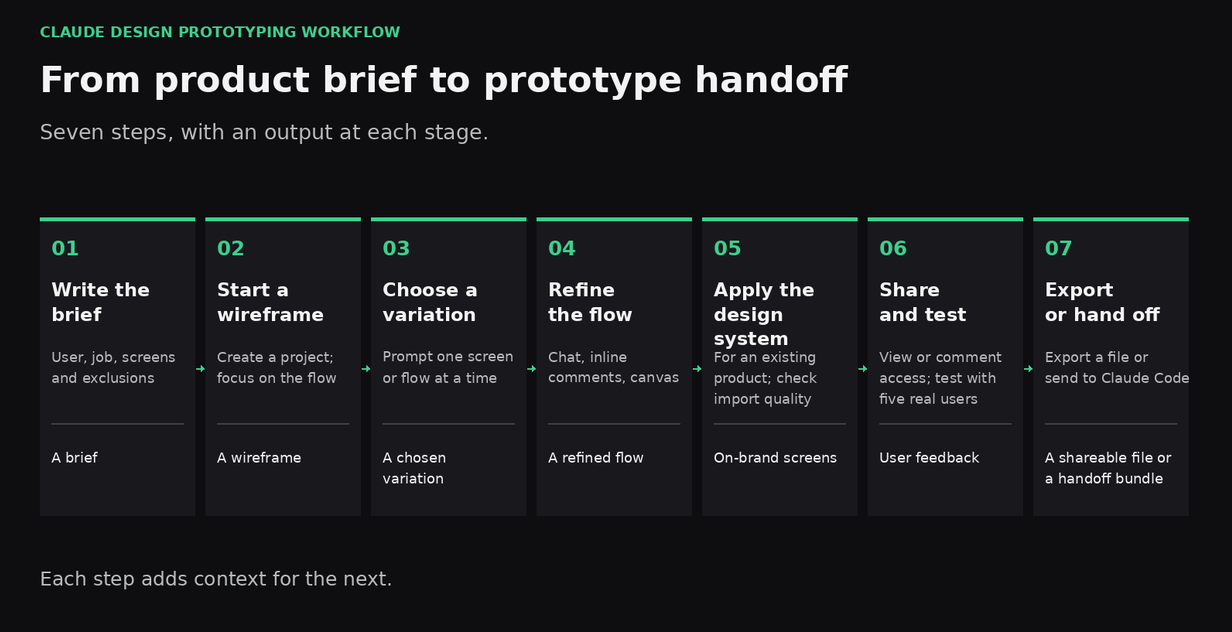
- Write a one-paragraph product brief before opening the tool. Identify the user, their main task, the three screens they need and what must not be in version one. This helps you design before you build by keeping the first prototype focused on a defined job.
- Create a project and start with a low-fidelity wireframe. Ask Claude to focus on structure, so reviewers assess the flow before colors and visual polish.
- Prompt one screen or flow at a time. Ask for two or three variations, compare them and select the direction that best fits your product. Comparing options helps the team make a deliberate choice instead of accepting the first result.
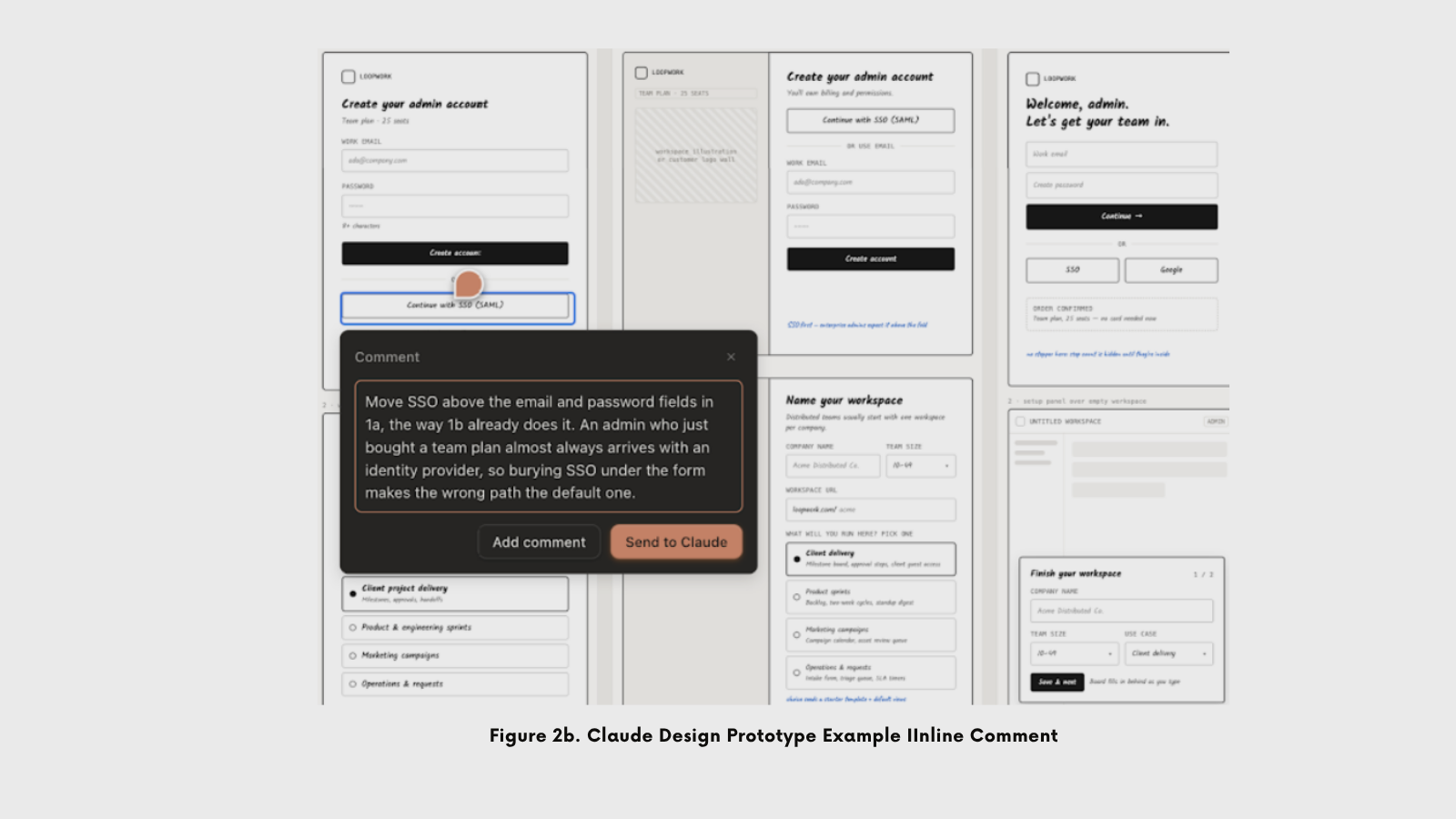
- Refine through canvas editing, chat or inline comments. Use canvas editing to drag, resize or align elements; use chat for broad changes; use inline comments for targeted changes to an element.
- Import your design system if the prototype is for an existing product. Import the design system from the GitHub repo, design files, or local codebase so the screens match what is already shipped. Import quality depends on the source files.
- Share the prototype link for feedback from five users. Ask users to complete the task before presenting it to budget decision-makers. Their feedback will help you identify problems such as confusing labels and missing steps.
- Export the prototype or hand it off to Claude Code. Export options include standalone HTML, PDF, PPTX, ZIP, Canva and export to Google Slides at claude.ai/design. For a coding handoff, choose “Send to local coding agent” or “Send to Claude Code Web”.
Claude Design Prompts That Produce a Usable Prototype
Use Claude Design prompts to define who will use the product, what they need to achieve and what belongs on screen. Leanware’s engineers used Loopwork, a project management tool for distributed teams, to build three prototypes:
- A B2B onboarding workflow
- An internal support operations dashboard
- A mobile intake flow document extraction
Prototype A: B2B onboarding flow
Prompt used
Design a B2B onboarding flow for Loopwork, a project management SaaS for distributed teams. The user is an admin who just purchased the team plan.
The flow should cover:
(1) a sign-up screen with email/password and an SSO option,
(2) workspace setup (company name, team size, a use case picked from a list),
(3) inviting a teammate by email with role selection.
Don't include the billing/payment screen in this version; that comes later.
Wireframe fidelity, not high fidelity.
Why this prompt works
- Identifying the user establishes who will use the screen.
- Listing required elements tells Claude Design what to include.
- Specifying an exclusion sets a boundary so that the screen stays in scope.
Prototype B: internal operations dashboard
Prompt used
Design an internal operations dashboard for Loopwork's support team, who review incoming customer requests (refunds, account verifications, and support tickets).
I need:
(1) a queue view listing items, with filters by status and priority,
(2) a detail view for a single item showing all relevant information,
(3) approve or reject actions from that detail view, with confirmation.
The user is an internal Loopwork operator, not an external customer.
Wireframe fidelity.
Why this prompt works
- Defines the internal operator’s tasks.
- Specifies a decision flow and required controls.
- Operators can approve or reject details before confirming.
Prototype C: mobile intake with document extraction
Prompt used
Design a mobile intake form for Loopwork where a user uploads a photo of an expense receipt and the app automatically extracts fields (merchant, date, amount) for the user to review and correct before submitting. Cover:
(1) the capture/upload screen,
(2) a review screen with the extracted fields editable,
(3) submission confirmation.
Include an "extracting data" state as part of the flow.
Wireframe fidelity.
Why this prompt works
- Specifies the full receipt submission workflow.
- Includes extraction progress and editable fields.
- Users can check and correct the results before submitting.
Claude Design Examples: Three Prototype Examples
Prototype A: B2B onboarding flow
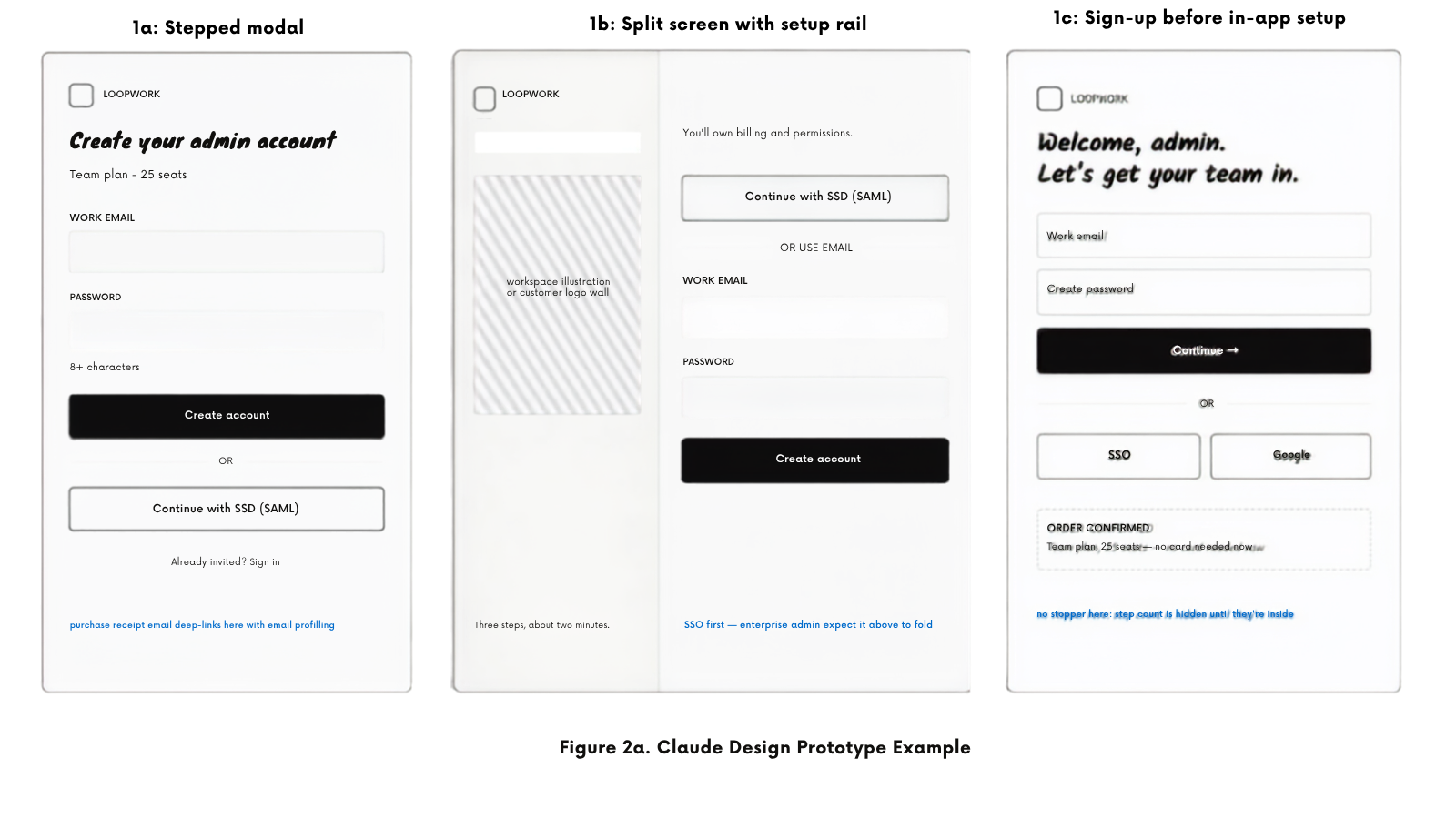
What came back: Three directions covering three screens: a modal with ordered steps; a split screen with a setup rail, seat counter, and sign-up, followed by setup over an empty workspace. Billing was excluded as requested. Unprompted, Claude Design flagged that it had invented role names, use-case options and seat counts, and offered to replace them.
Second pass: The team selected the split-screen direction 1b. Icons carry no meaning at wireframe fidelity, so an inline comment asked Claude Design to replace the use-case 2X2 icon grid with a single-select list and a line of explanatory text for each option. Claude Design updated the control and, without being asked, resized frames in two directions, revealing clipped CTA buttons.
What a user test could tell you: Whether a new admin understands that setup and invitations come before starting work and whether the use-case option reflects their team’s needs.
What a user test could not tell you: Correct role permissions, how much SSO integration costs, or how to represent workspaces and seats in the data model.
Prototype B: internal operations dashboard
What came back: One flow instead of a set of alternatives. A queued table containing status and priority filters, a detailed item screen with evidence on the left, decision controls on the right and a confirmation modal. When asked, Claude Design generated a partial alternative with the queue beside the selected item: two complete, comparable variations.
Second pass: An inline comment on the filter bar requested saved views. While keeping existing filters, Claude Design added a dropdown, two quick-access options, and a save control. The team developed a partial alternative into a 3-pane layout with approve and reject confirmation appearing at the top of the detail pane so that the queue remained visible.
What a user test could tell you: Whether operators process requests faster with a queue and full-page details side by side. Whether the detail pane contained enough information to make a decision.
What a user test could not tell you: Who has permission to approve refunds, where requests above an approval limit are routed, how policy checks get their answers or whether an operator can revise a refund after reaching the payment processor.
Prototype C: mobile intake with document extraction
What came back: Three complete variations covering receipt capture, extraction, review and confirmation. One provided a real-time, step-by-step user guide; another kept the receipt visible; and the third asked users to confirm one item at a time. The extraction screen indicated fields being checked off as processing continued.
Second pass: The team selected the version that kept an image of the receipt. They added an amount flagged as uncertain for the user to confirm and another screen for extraction failure. An inline comment on the Amount field requested a cropped receipt image beneath the amount and confidence indicators for the Merchant and Date fields.
What a user test could tell you: Whether users trust the extracted amount enough to submit without checking a receipt image, and whether the failure screen helps them continue or abandon the request.
What a user test could not tell you: Which extraction service to use, cost per document, how long to keep receipt images, or what happens when a submitted expense turns out to be wrong.
Claude Design vs Figma, Figma Make, Lovable and v0: Which One for Which Job
This comparison table compares five tools by output, intended users, design-system support, engineering handoff, and pricing.
Comparison | Claude Design | Figma Design | Figma Make | Lovable | V0 |
|---|---|---|---|---|---|
Output | Designs and interactive prototypes; exportable HTML and other formats | Editable design files, interactive prototypes and reusable components | Functional prototypes and web apps from prompts or existing designs; optional Supabase backend | Working web apps with frontend, backend, database, authentication and integrations | UI components, pages and full web apps with database and API integrations |
Who it is for | Founders, product managers and designers | Designers and product teams | Designers and product teams | Founders, business teams and developers | Developers and product teams |
Code to ship | Treat the prototype as development input; assess and complete the code before production | The design file is not code; developers implement using design specifications and connected components | General runnable app code; review, test and complete before production | Deployable application code, subject to engineering review, testing and security checks | Deployable application code, subject to engineering review, testing and security checks |
Design-system support | Imports existing systems from repositories, design files or local code; results depend on source quality | Shared components, styles and shared libraries; broader governance varies by plan | Library styling context, and make kits containing component packages, styles and guidelines | Reusable React component libraries, styling rules and design tokens on paid plans | Reusable colors, typography and styles across projects |
Engineering handoff | Handoff to Claude Code or share exported HTML or project materials | Dev Mode provides specifications and assets; Code Connect and MCP supply context | Share the working prototype; Figma’s MCP server gives coding agents access to Make context | Sync the codebase with GitHub for review and continued development | Sync the codebase with GitHub and deploy through Vercel |
Pricing model | Included in paid Claude plans and shares their usage limits | Free starter plans, paid subscriptions and price by seat | Limited free access, paid seat allowed with AI credits and additional usage option | Free tier, paid workspace subscriptions with usage credits | Free tier, paid per user subscriptions with included credits and usage purchases |
What a Claude Design Prototype Settles, and What It Leaves Undecided
The prototype may look finished but is not quite ready to build yet. The prototype helps you answer, "Is this the right product for my team?” but it doesn't tell you the production development effort.
Prototype vs MVP: The prototype tests the idea; the MVP tests with real users using real data.
A Claude Design prototype lets teams collaborate on screens and workflows. User testing is important here because it lets you see whether first-time users understand what to do. Asking someone to set up a workspace may reveal whether labels make sense or whether the next step is unclear. You cannot get that type of feedback from screens alone; observing people using them gives you proof of where users understand the flow or struggle.
The B2B onboarding workflow does not show how SSO will authenticate users. The internal operations dashboard doesn't define who can approve a request. The mobile intake flow doesn't include an extraction service. Each screen needs acceptance criteria that show how the finished product must behave, including when something goes wrong.
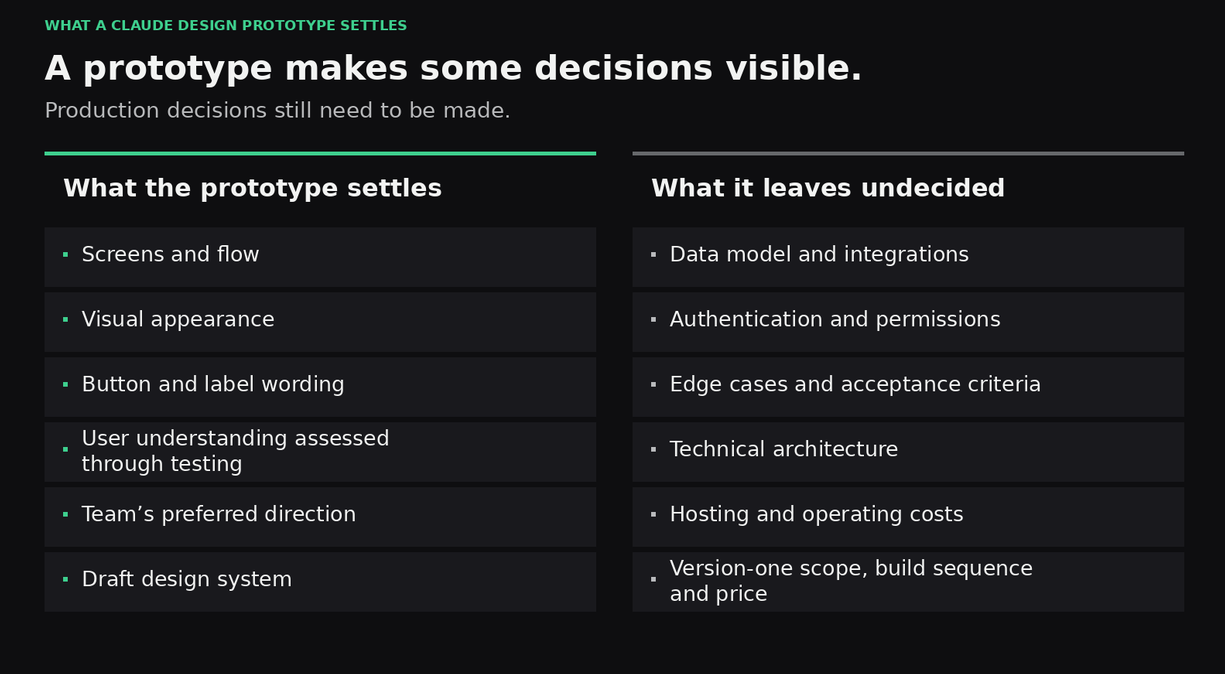
What the prototype settles: A first-draft design system, button and label names, visual appearance, screens, workflows, and user testing.
What the prototype leaves undecided: A data model, integrations, authentication, permissions, and operating costs.
Leanware’s software product development service takes a prototype from ideation to launch.
From Prototype to Build: The Handoff Bundle and What to Add Before Anyone Writes Production Code
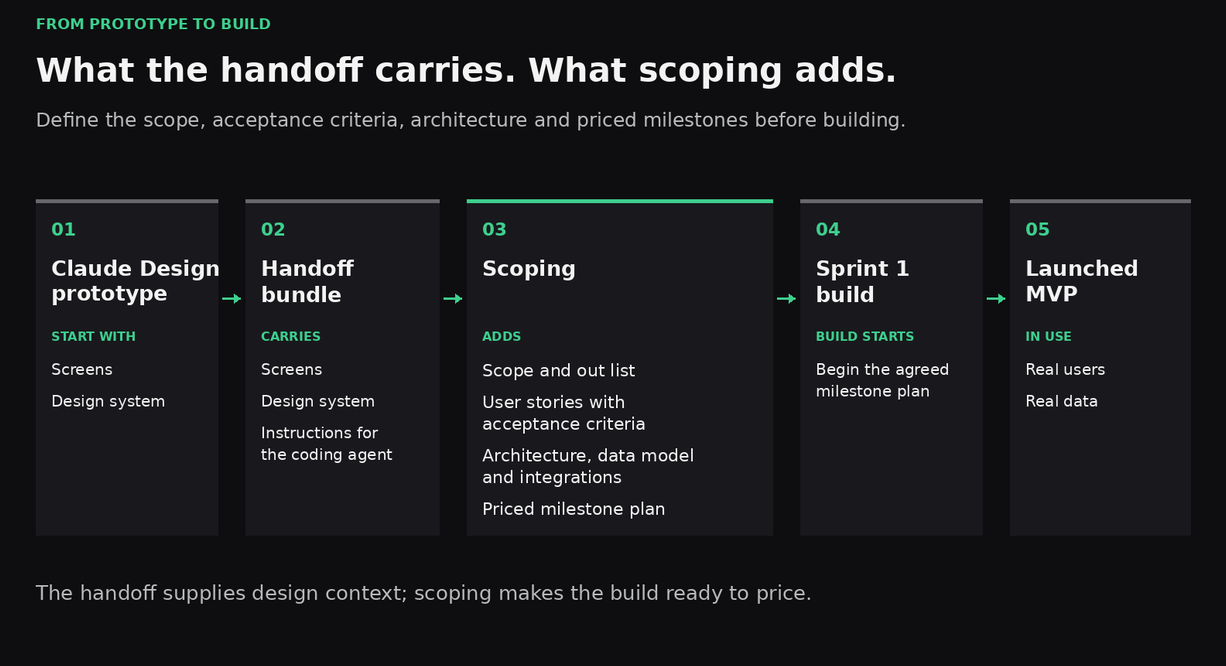
When you have a working prototype, the next step is to share context with developers so they can plan the build. As a starting point, Claude Design provides screens, instructions, and a design system. But before production development can begin, the team still needs scope, acceptance criteria, technical architecture and a pricing plan.
Claude Design also offers “Send to local coding agent” and "Send to Claude Code Web” bundles. It packages the screens, design systems, and instructions so the coding agent can start from the prototype. Giving developers a head start on the front end. However, the bundle doesn't define the scope, a build plan or technical architecture.
Before you can start writing code, your team must define version 1, including a list of what not to include. Epics and user stories need acceptance criteria that explain how each feature would be tested and accepted. The technical architecture covers the data model and integrations; the build plan defines and prices each milestone.
Leanware’s Sprint 0 is a fixed-fee, fixed-scope discovery sprint of $5,000 to $15,000 over two to four weeks. There are 4 deliverables:
- UI/UX design and design system
- Epics and user stories with acceptance criteria
- A billable milestone plan with every milestone defined and priced
- Technical architecture with repository scaffolding
You make a go/no-go decision after Sprint 0 and before Sprint 1. The design system deliverable can start from it while the scoping work turns the prototype into something a team can price.
If You Already Built on the Prototype
You can send a prototype to Claude Code, Lovable, or Replit and continue building. You need to be sure that the code behind the screen can support real users and real data. A review would examine the data model, authentication and permissions, secrets and keys, error handling, tests and deployability.
Our guide to what to check before a vibe-coded app takes real users lists what you can verify yourself before that review.
Leanware’s code audit is a fixed-fee audit of $4,000 to $12,000, one to two weeks, one senior engineer, for AI-built and inherited apps.
This is your opportunity to understand what you have and what needs attention before moving forward.
Is Claude Design Free? Plans, Limits and What It Costs to Prototype
Claude Design is included in Pro, Max, Team and Enterprise plans and is unavailable on the Free plan. On Enterprise, Claude Design is off by default until an organization owner enables it in Organization settings -> Artifacts. Prototyping shares the allowance used by Chat, Claude Code and Cowork and can consume usage for other work.
In her 2026 review for Lenny’s newsletter, Claire Vo reported hitting usage limits during extended Claude Design sessions.
To manage your usage allowance, start with wireframes and focus on one flow at a time. Save visual styles for the final direction. You can add more screens after reviewing the first workflow. This reduces your early requests and avoids spending time on designs you may discard.
Final Thoughts
A Claude Design prototype helps you determine whether your idea is going in the right direction for users. A finished prototype can make the build seem closer to completion than it really is. If you have a prototype ready, you can send Leanware the link for a read on what the build would look like.
Frequently Asked Questions
What is Claude Design?
Claude Design is Anthropic’s tool for creating designs, interactive prototypes and one-pagers by describing what you need to Claude. Anthropic Labs launched it on April 17, 2026, for Pro, Max, Team and Enterprise subscribers.
Is Claude Design free?
No. As of September 2026, Claude Design is included with the Pro, Max, Team and Enterprise plans and is not available on the Free plan. It draws from the same usage limits as chat and Claude Code.
What is the difference between Claude Design and Claude Code?
Claude Design focuses on the visual user interface, enabling non-technical teams and designers to build prototypes. Claude Code is an agentic command-line interface (CLI) and integrated development environment (IDE) tool built for software engineers to write production code, edit repository files, run terminal commands, and implement full applications.
Can Claude Design export to Figma?
The Claude Help Center does not list Figma as an export destination. Exports include standalone HTML, PDF, PPTX, ZIP, Google Slides at claude.ai/design and connectors such as Canva, Lovable, Replit and v0.
Is a Claude Design prototype an MVP?
No, a Claude Design prototype demos screens and flows. A minimum viable product (MVP) is a working product with real users and real data. Moving into MVP development requires defining the scope, architecture, and build plan.
How do I hand a Claude Design prototype to developers?
Send the handoff bundle to Claude Code, or share the exported HTML and design system with developers. Before quoting the build, the team must produce these four things: a scope with an explicit out list, user stories with acceptance criteria, the technical architecture, and a priced milestone plan.
Sources
- Getting Started with Claude Design
- Live Claude Design
- Figma Design
- Figma Make
- Figma Dev Mode
- Welcome to Lovable
- Lovable Design System Guide
- Lovable Subscription Plans
- V0 Product Page
- V0 Pricing Page
- Leanware’s Software Product Development Service
- Leanware’s Code Audit
- Leanware’s Sprint 0
- Acceptance Criteria Examples
- Leanware Contact
- MVP Development
- Lenny’s Newsletter