Build vs Buy Software: When One System Beats a Stack of Subscriptions
The build vs buy software decision starts with the work. Buy when one product already fits the work or holds your records, such as accounting, payroll or a dealer management system. Build when the work runs across several tools, people re-type the same data between them, and the hours lost cost more than the seats.
AI has changed the build or buy calculation. At Leanware, a light internal system now costs roughly $20,000 to $40,000 to build with AI-assisted senior engineers, enough to replace the shallow use of 2 to 3 tools where a team needs only a few features from each. Many owners now arrive with a working version they built using Claude or ChatGPT.
This guide is for owners, operators and operations managers at companies with 10 to 50 people who pay for 3 to 6 tools to complete one workflow: estimates, crew assignments and invoices; sales, financing and insurance; or intake, scheduling and follow-up.
Prices are from vendor pricing pages or Leanware’s published fees, with the month checked stated alongside them. The quote-only contractor CRM uses a clearly identified third-party estimate. All scenarios are fictional and labeled as such. The payback calculations depend mainly on hours saved, with canceled subscriptions helping cover ongoing costs.
Build or Buy: A Quick Way to Decide
Buy or build comes down to three questions: does one product already cover the work, do people re-type the same data between tools, and will anyone own the software after launch? In three of the five build vs buy situations below, the honest answer is to buy.
Situation | Buy | Build | Why |
The tool is a system of record, such as accounting, payroll or a dealer management system. | Keep it. | Build connections around it, if needed. | Official records stay in the system built for them; anything you build connects to it. |
One industry product covers the whole workflow, such as Jobber or ServiceTitan for home services. | Use the product that fits. | Don’t build it. | Buying avoids rebuilding functions already available. |
Work crosses three or more tools, and people re-type the same data between them. | Keep the underlying systems of record. | Build the connecting layer. | A connecting layer moves data between systems so nobody re-types it. |
The workflow is how you win or deliver work, such as quoting, scheduling crews or structuring a deal. | Buy the standard functions. | Build the parts specific to your process. | Your team can follow the process that serves customers best without forcing it into a generic product. |
Nobody owns the software after launch. | Buy now and revisit later. | Establish or pay for ongoing ownership before building. | Custom software needs someone responsible for fixes, updates and support. |
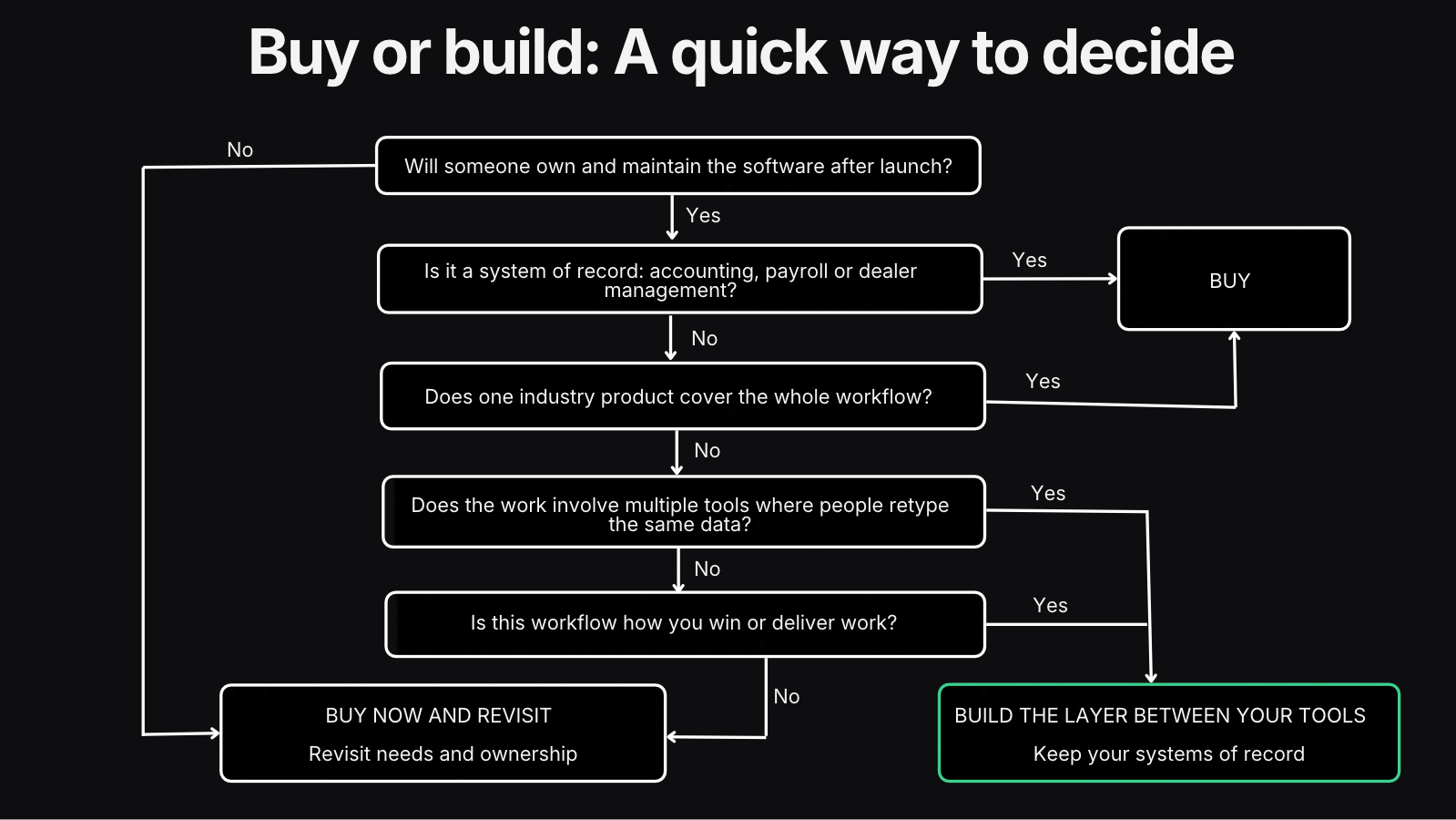
For teams that need light customization without owning code, no-code tools offer a middle option between buying a ready-made product and building custom software.
What AI Changed in the Build vs Buy Decision
AI has changed the build vs buy software decision in two ways: writing code costs less, and owners can create a working version before hiring an engineering team.
At Leanware, a light internal system is a $20,000 to $40,000 build with AI-assisted senior engineers. Larger systems are priced after a scoped discovery phase. A light build replaces the shallow usage of 2 or 3 tools, where the team uses a few features of each.
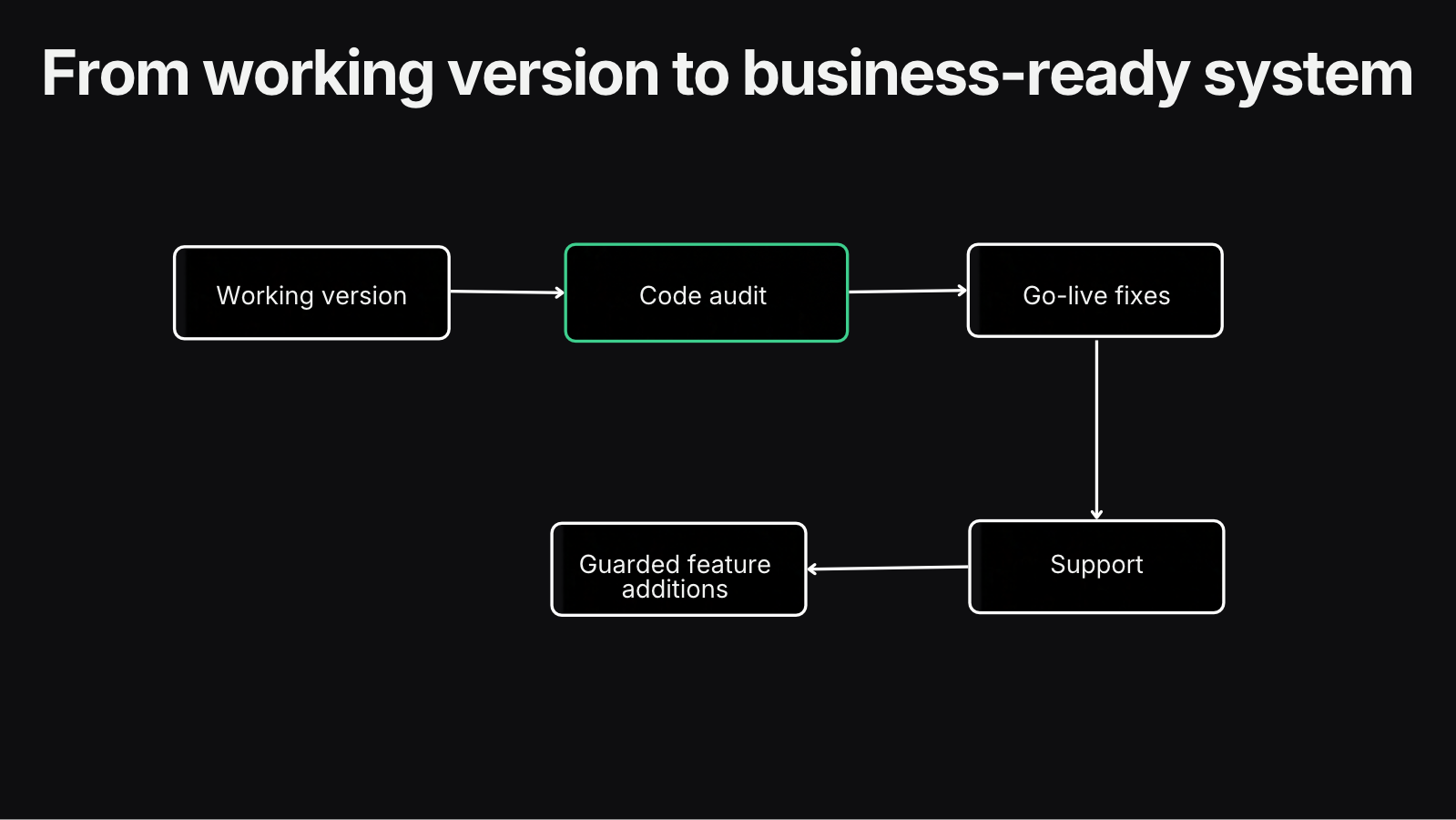
The second change is where the work starts. Owners and operations managers now use Claude or ChatGPT with hosted services such as Supabase, Netlify or Vercel to create working versions. When you build it yourself with AI, the next step is an engineering audit and go-live preparation.
Two fictional scenarios show this shift. In scenario A, a contractor tries a long list of job management systems before building its own all-in-one tool. The engineering work starts with checking the working version and preparing it for daily use. In scenario B, an equipment dealer’s sales, financing and insurance teams each build an app on a separate database. The next task is to review those apps and connect the work across teams.
One thing stays the same: security, customer data protection, backups, integrations with systems of record, and accountability when the software breaks still cost money. AI reduces coding effort, but it doesn’t remove those responsibilities or the budget they need.
The Real Cost of a Stack of Subscriptions
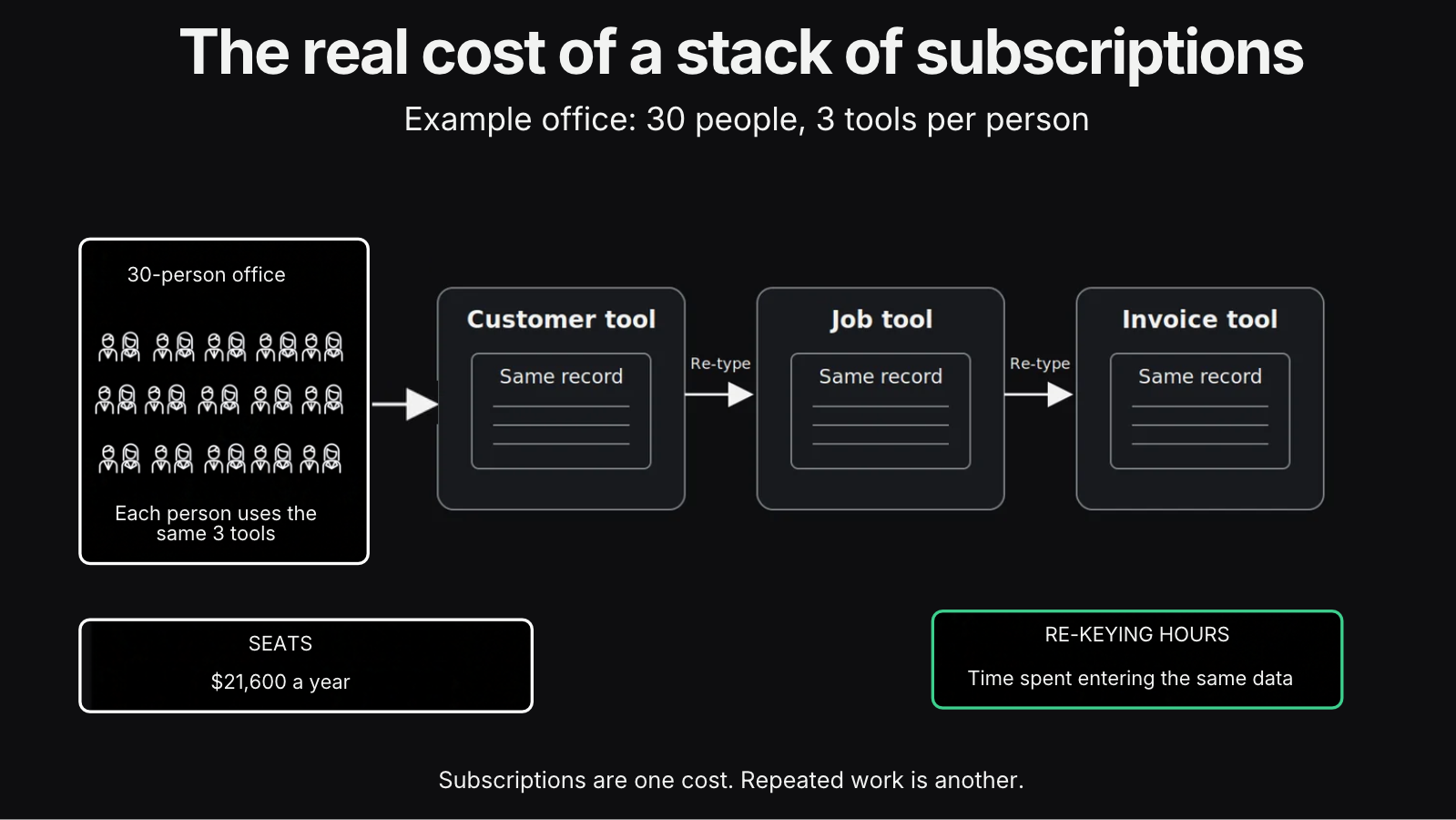
Think of a fictional office with 30 people using 3 tools each at $20 per seat per month. 30 people x 3 tools x $20 = $1,800 a month, or $21,600 a year, before price increases and before the next hire. That covers subscriptions alone. It does not include the hours spent re-typing the same record between tools.
Prices from each vendor’s pricing page, as of October 2026.
Product | Purchase price | Billing |
$90 per seat per month | Annual. Onboarding costs extra. | |
Standard = $30 Business Pro = $45 per user per month | Annual. Billed monthly. | |
$16 per seat per month | Annual. | |
$119 per month for 3 users $29 per additional user | Annual. | |
Starter: $97 Unlimited: $297 Agency Pro: $497 per month | Monthly platform subscriptions, with unlimited users. | |
From $69 per month | Annual. Cost depends on task allowance. |
The invoice leaves out three costs.
First, people re-type the same customer, job or deal into separate tools. An office employee might enter a customer’s details in the CRM, copy it into a job tool, then enter it again when preparing an invoice. Each entry takes time and creates another opportunity for a mismatch.
Second, someone maintains the connections. Zapier Zaps and spreadsheets can keep work moving, but a vendor’s field change can break those connections. Someone then has to find the problem, repair it and reconcile the affected records.
Third, per-seat pricing grows with headcount, even when each person uses only a few features. The invoice shows the extra seats; it does not show how much of each product the team uses.
The custom software vs off-the-shelf comparison needs to include subscriptions, re-keying time and maintenance on both sides. Custom software makes sense when a connecting layer saves enough re-keying time to cover its build and running costs. If customer management is the main gap, the guide to custom CRM development covers that decision in more detail.
Build vs Buy Software: Reference Scenarios With Payback and ROI
These fictional scenarios combine vendor list prices, Leanware’s published pricing and assumed time savings. Find the row closest to your company, then compare its assumptions with your own costs and workflow. These are examples for planning, not quotes or guaranteed returns.
Scenario (fictional) | Tools replaced per month | Time saved | One-time cost | Running cost per month | Net per month | Payback | First-year ROI | Verdict |
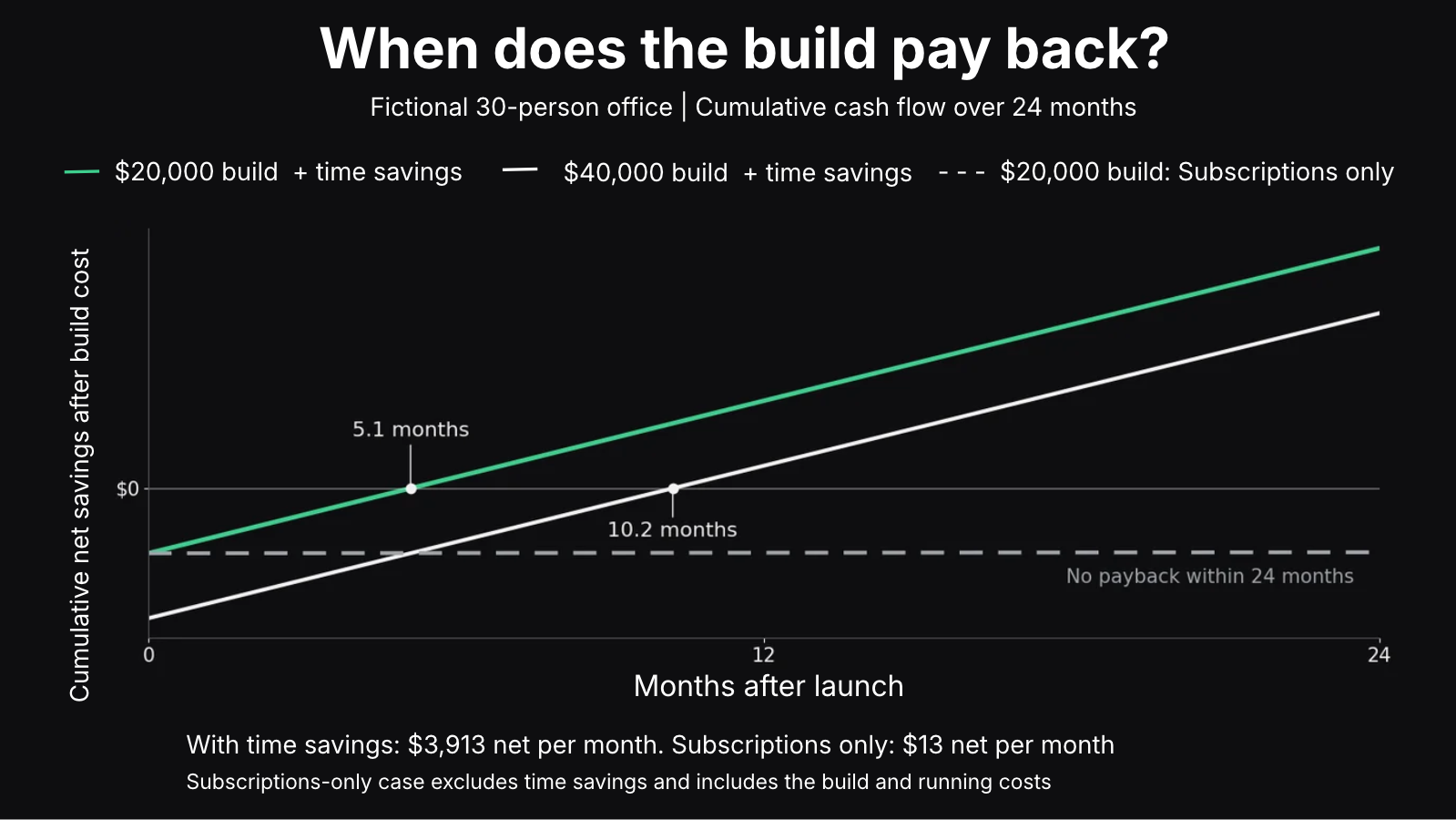
30-person office, 3 tools each at $20 a seat, light build at the low end. | $1,800 | $3,900 30 hours a week. | $20,000 light build. | $1,787 | $3,913 | 5.1 months. | 135% | Build |
Same office, light build at the high end. | $1,800 | $3,900 30 hours a week. | $40,000 light build. | $1,787 | $3,913 | 10.2 months. | 17% | Build if the time saving is real. |
A. Exterior contractor, 8 office staff, and 20 crew; the owner already built a working all-in-one system with AI. | $1,365 Contractor CRM, job photos, crew time clock, e-signature, marketing CRM, Zapier. | $1,690 13 hours a week. | $8,000 code audit. | $1,747 | $1,308 | 6.1 months. | 96% | Audit it, then go live. |
B. Equipment dealer with financing and insurance arms, 35 office users; each team built its own app with AI. | $2,220 HubSpot Sales Hub Pro, DocuSign Business Pro, Typeform, Zapier, Calendly. | $4,550 35 hours a week. | $32,000 $12,000 code audit plus $20,000 to consolidate into 1 system | $1,807 | $4,963 | 6.4 months. | 86% | Audit, then consolidate |
C. Home services company, 15 users, already on one field service product (Jobber Grow). | $399 | $260 2 hours a week. | None | $1,727 | Minus $1,068 | Never | N/A | Keep buying |
D. Six-person professional services firm with a light stack (scheduling, eSignature, forms, Zapier). | $231 | $260 2 hours a week. | None | $1,727 | Minus $1,236 | Never | N/A | Keep buying |
Tool costs use October 2026 vendor list prices, with annual billing where offered. The quote-only contractor CRM uses the low end of published third-party estimates, $60 per user. For multi-tool scenarios, assumed re-keying savings are one hour per office user each week and 15 minutes per field worker, valued at $30 an hour; C and D assume only 2 hours a week. Running costs include Leanware’s support retainer, from $1,682 a month for 42 hours of engineering time, plus hosting and AI seats. The owner’s time spent building the first version is excluded. Net monthly savings equal canceled subscriptions plus the value of time saved, minus running costs. First-year ROI equals 12 months of net savings minus the one-time cost, divided by that cost.
Subscriptions alone don’t justify owning software. In the 30-person office, canceled seats of $1,800 barely cover running costs of $1,787. Without time savings, just $13 a month remains to recover the build cost, so neither build ever pays back. If each person saves 30 minutes a week instead of an hour, payback stretches to 10.2 months for the $20,000 build and 20.4 months for the $40,000 build. The tools you cancel cover running costs; hours you get back pay for the build.
An existing version built with AI also cuts the upfront work. In A, the next investment is a code audit; in B, it is an audit followed by consolidation. Their payback periods of 6.1 and 6.4 months are shorter than the high-end office build’s 10.2 months, although the low-end office build remains fastest at 5.1 months.
The keep-buying rows matter just as much. When one product already fits, as in C, or the stack is small, as in D, owning software costs more to run than the subscriptions and staff time it would replace. Buying is the right answer.
Can Claude or ChatGPT Build Your CRM?
Yes, a non-technical owner can build a working CRM or job management system with Claude or ChatGPT in weeks, and many already do. You can build your own CRM around the work your team handles every day.
The fictional exterior contractor in scenario A shows what that can look like. Estimates trigger crew assignments and invoices; crews clock in and complete safety forms through a mobile view; and customers submit their details through an intake form. A Claude CRM brings those tasks into one place. If you would rather buy the same idea, Salesforce and Anthropic announced Claudeforce in August 2026, which connects Claude to Salesforce’s CRM data and workflows.
But a working version still needs preparation before the business depends on it. You must control who can see each customer’s records, know where the data lives and confirm that backups can restore it. Updates need a reliable deployment process that protects the live version, and the QuickBooks integration must transfer records correctly. Monitoring must flag failures, with someone available to respond when the owner is on vacation.
If you build a custom CRM with AI, audit the code before your team relies on it. The audit identifies what needs fixing before launch; the production readiness checklist covers the full set of checks.
An AI agent is a separate decision: using AI to build the software does not mean the finished system needs an agent to run its workflows.
Adding Features After Launch Without Breaking What Works
Owning the software gives your team room to keep improving it. With AI, a non-technical user can describe a change and get it built, but every addition creates more code to secure and maintain.
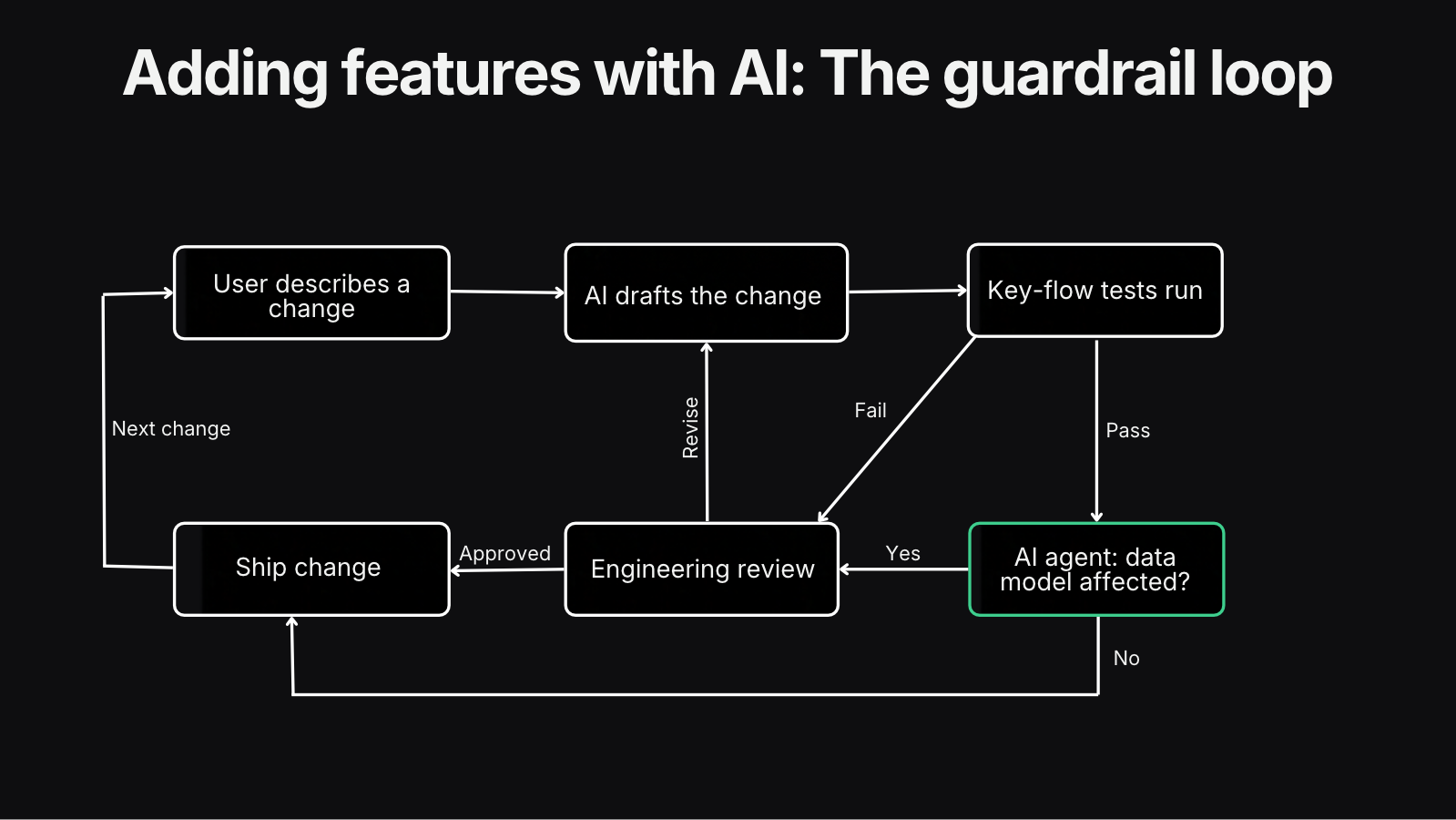
Leanware sets up guardrails so non-technical users can add features with AI, combining deterministic checks that run on every change with an AI review of what the change touches. These guardrails flag additions that need engineering review before they ship. Examples include automated tests covering the key flows and an AI agent that flags changes affecting the data model; those changes get an engineer’s review before release.
Features added this way are the cheapest kind of build because they extend a system you already own. That helps protect the payback calculation, provided the guardrails catch risky changes before they create repair costs or interrupt daily work.
Is SaaS Dead? Will AI Replace SaaS?
The answer to “is SaaS dead” is no. A better question is which parts of your software stack AI makes cheaper to own. This is the buyer’s side of the question: which tools you keep paying for, not whether SaaS companies survive.
The February 2026 software stock selloff fueled the “SaaS is dead” argument as investors worried that AI could replace established applications. The press called the selloff the “SaaSpocalypse.” In a February 11, 2026 analysis, Forrester argued that core enterprise software would evolve rather than disappear, while standalone tools with easily replicated features would face more pressure.
For your business, “will AI replace SaaS” is a decision about individual tools. Keep buying systems of record such as accounting, payroll and dealer management software, along with an all-in-one product that already fits the work. An owned system can replace narrowly focused per-seat tools and the connections between them when doing so saves enough time to cover its costs.
So what will replace SaaS? For most companies this size, it is a mix: bought systems of record with a small owned system on top that moves data between your tools and cuts the re-typing.
Who Owns It After Go-Live
At 9:00 a.m., the crew app will not sync, and people are waiting for their assignments. Someone has to fix it, keep the software patched, and decide what to build next. That ongoing responsibility belongs in the budget before you build.
An in-house developer fits a company with enough ongoing work to support the role. They learn the business, maintain the system and develop new features as priorities change.
A support retainer fits a company that needs regular maintenance without hiring a full-time developer. As of October 2026, Leanware’s Application Support and Maintenance starts at $1,682 a month for 42 hours of engineering time, with US business hours, no minimum term and 30 days' notice. The retainer covers monitoring, incident response, bug fixes, security patches, and small enhancements.
A part-time technical owner helps decide where the system goes next. A Fractional CTO can own the roadmap, weigh requests against the budget, and guide the engineering team. This role can work alongside an in-house developer or a support provider.
If you have nothing built yet, start with a discovery phase before committing to the build. Define what the system must do, what it must connect to and who will own it after launch.
Final Thoughts
Buy what already fits your work and holds your official records, and build the layer that stops your team re-typing data between tools. Count the hours saved alongside the seat fees, including the cost of keeping the system running. If you've already built a working version with AI, start with an audit instead of a rebuild. Tell us about your workflow, the tools you use and where your team repeats work, and we can help you assess the next step.
Frequently Asked Questions
Is it cheaper to build or buy software?
Buying is usually cheaper when one product fits your workflow, or you need only a small stack of tools. Building pays off when the work spans several tools and re-keying eats up hours. Compare subscription fees and staff time with the build cost and ongoing support. The scenarios table shows where those savings justify building and where buying remains the cheaper choice.
How much does it cost to build a custom internal system with AI?
Leanware’s reference for a light internal system is $20,000 to $40,000 with AI-assisted senior engineers. A light build replaces the shallow usage of 2 or 3 tools, where the team uses a few features of each. We price larger systems after a scoped discovery phase. Budget separately for ongoing running costs, including hosting, maintenance and engineering support.
Can ChatGPT or Claude build a CRM for my business?
Yes, ChatGPT or Claude can help you build a working CRM for your business. Before your team relies on it, set up access controls, backups, a reliable deployment process, accounting integration, and a named owner for maintenance and issue resolution.
Is SaaS dead with AI?
No, SaaS is not dead. AI makes it cheaper to replace narrowly focused per-seat tools and the re-keying or connections between them. Keep buying systems of record, such as accounting, payroll and dealer management software, when they already fit your business.
What will replace SaaS?
For most small and mid-sized companies, the practical alternative is a mix of owned internal systems for their workflows, bought systems of record and AI agents for specific processes. For example, a custom system could connect quoting and scheduling to accounting software, while an AI agent handles incoming documents.
What are the disadvantages of bespoke software?
Custom software makes you responsible for maintenance, security, and deciding what to build next. Someone must be accountable for fixing problems, applying updates and managing priorities. Without that ownership, support can become unreliable. Also, adding features without review can gradually make the system harder to use and maintain.
What does custom software cost to run after launch?
The running cost of custom software includes hosting, AI subscriptions and engineering support, with engineering time making up the largest share. Hosting and AI seats are small: tens of dollars a month for a system this size. Budget for someone to fix bugs, apply security updates and maintain integrations.