How to Build an App in 2026: DIY with AI or Hire a Firm
If you are working out how to build an app in 2026, there are two realistic routes. You build it yourself with AI coding tools, or you hire a firm and pay against milestones as they ship.
Complexity decides most of it, along with what breaks when the app goes down and how many hours a week you can honestly give this.
Below you will find both paths, the checklist to bring to a first call, and the engagement sequence that keeps your budget visible.
What You Need Before You Build Anything
Most guides on how to create an app start with tools. Start with these four things instead, none of which takes longer than an afternoon.
A problem statement, in one paragraph. Who has the problem, what it costs them today, and what they do instead right now.
A target user, specific enough to name. "Small business owners" is not a user. "Independent physiotherapists with two to five staff who currently book by phone" is.
Some evidence somebody wants this. Ten conversations count. A waitlist counts. A spreadsheet your team already maintains by hand is the strongest signal on this list.
Three to five core workflows, each written as "user does X to get Y." Not features, workflows. If you cannot get to five, that is good news, because your first version is smaller than you thought.
That is the whole prerequisite. If you want to go deeper on the commercial case, our business plan guide for apps covers it, and the app requirements document template has the full structure for when you need one. Neither is required reading before you carry on here.
The Two Realistic Paths in 2026
Ask ten people the best way to build an app and most will describe whatever they happen to sell. So here is ours with the bias declared: we sell the second path, and we still think a good number of readers should take the first one.
AI coding tools have changed what one person can build alone, and that is not marketing, it is just where the tooling has got to. They also have a limit, and it tends to show up after the app is finished and working rather than while you are building it.
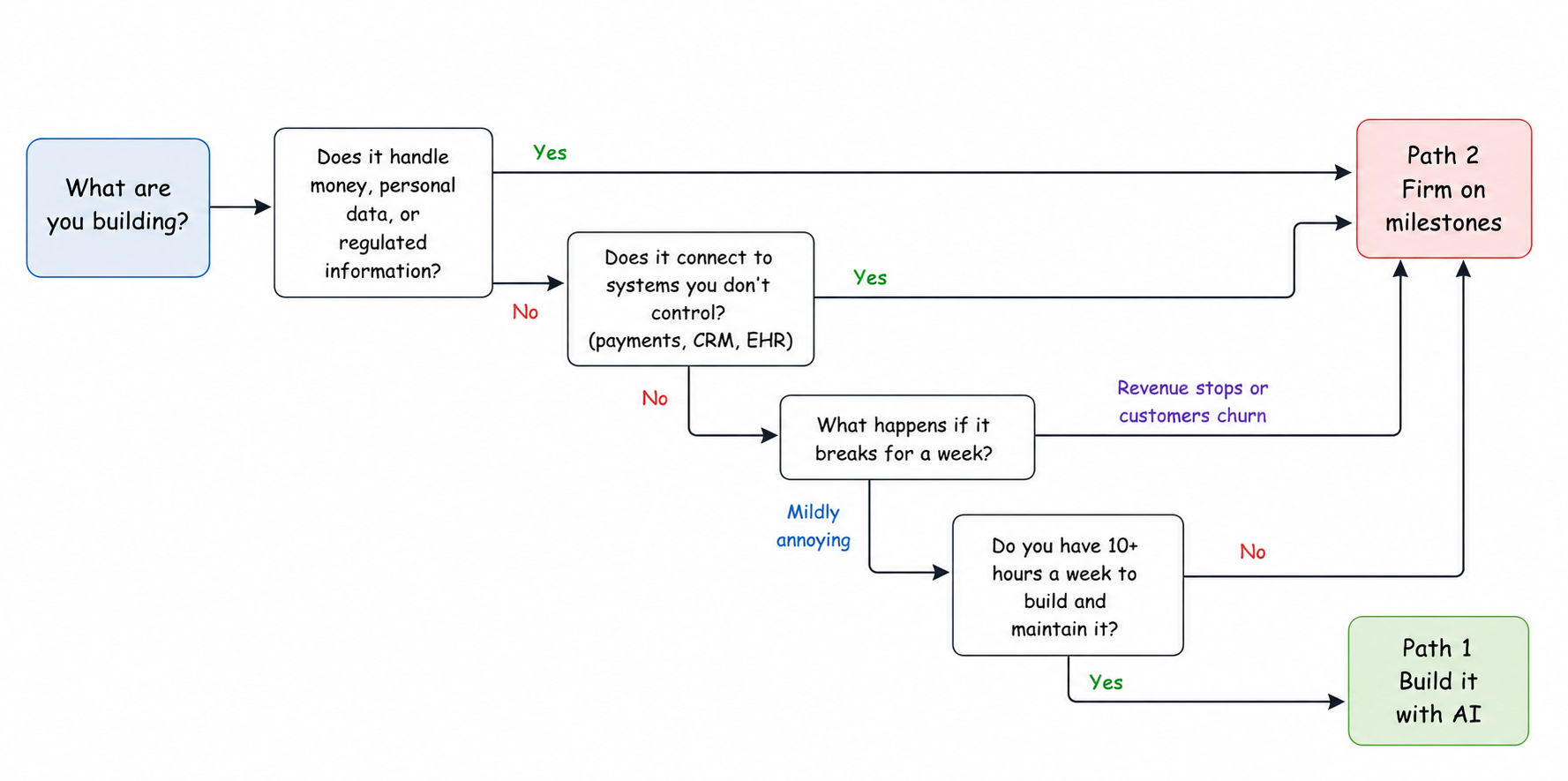
Notice the questions are about stakes and integrations rather than how technical you are. A non-technical founder building an internal scheduling tool is on safer ground than an engineer building a payments flow in their spare time.
Deciding how to make an app is really deciding who makes it, and the same two paths apply whether you are working out how to build a mobile app or a web one. The tooling changes, the decision does not.
Path 1: Building It Yourself with AI
AI-assisted building handles a longer list of work than it did a year ago. Prototypes and demos, internal tools and dashboards, single-workflow apps where one type of user does one main thing, and anything you are building to find out whether people want it before you spend real money.
If your app is on that list, build it yourself. You will learn more in three weekends than any discovery process will tell you, and you will spend a few hundred dollars rather than tens of thousands. Our guide to vibe coding covers the hands-on workflow.
The boundary is sharper than the marketing suggests, and it has nothing to do with whether your app works.
Veracode has been running the same security test across large language models since 2025. In its Spring 2026 update, covering more than 150 models, syntax correctness came in above 95% while the security pass rate sat at roughly 55%. In about 45% of generations the model introduced a known security flaw, and that figure has barely moved in two years.
The gap between those two numbers is where founders can run into problems. Your app works, does what you asked, and passes the tests you wrote, while the flaw stays hidden until someone finds it.
Moltbook, a social network for AI agents launched in January 2026, is the clearest example. Its founder said he wrote no code at all. Within days, researchers at Wiz found the Supabase API key in the site's client-side JavaScript, and because row-level security had never been turned on, that key opened the whole database: 1.5 million API tokens and 35,000 email addresses.
Every feature of that app worked. One security setting was never turned on, and the AI had no reason to mention it.
The same pattern shows up in every category where DIY predictably fails.
Authentication and authorization. Getting login working is easy. Making sure user A can never read user B's records is a different problem, and it stays invisible until somebody tries.
Data modeling. Your schema is a decision you make once and live with. Bad ones do not announce themselves until month six, when a simple feature suddenly requires touching forty files.
Integrations. Payments, calendars, CRMs and EHRs all carry failure modes, rate limits and edge cases that only appear under real load.
Maintenance. Nobody prices this in. Dependencies need updating, APIs change underneath you, and somebody has to be awake when it breaks at 11pm.
Developers themselves are clear-eyed about this. Stack Overflow surveyed more than 49,000 of them in 2025 and found 84% using or planning to use AI tools. Only 33% said they trust the accuracy of AI output, while 46% said they distrust it, and more than three quarters said vibe coding is not part of their professional development work. They reach for these tools daily and still read every line that comes out.
The most common path we see is to build version one yourself, put it in front of real users, and find out whether anyone wants it. If the answer is yes and the thing now handles other people's money or data, rebuild the production version properly. That sequence is the DIY path working as intended.
Before you decide, the production readiness checklist for apps built with Lovable, Base44, Bolt or Replit tells you which gaps can be fixed in place and which ones force the rebuild.
Path 2: Engaging a Development Firm on Milestones
Milestone-based engagement breaks the build into defined chunks, each priced individually before work starts. You pay as each milestone is delivered and accepted, and you can stop at any boundary while keeping everything shipped up to that point.
Two structural things follow, and they are the reason we use the model.
Cost becomes visible before commitment, because you see the full sequence and every price on it up front rather than a single number at the bottom of a proposal.
Leverage also stays with you, since a relationship that is not working after milestone three ends with you holding three milestones of working software. Exit is how the model is built rather than something you negotiate.
The alternatives are not villains, and each fits a shape of work.
Open-ended hourly gives you flexibility, which is the right answer when scope genuinely cannot be pinned down. An evolving roadmap has no honest milestones to bill against, and pretending otherwise produces fiction. What hourly asks in return is that somebody on your side watches the burn every week.
If that describes your situation, a dedicated development team on a monthly retainer is the cleaner structure, and we route people there rather than inventing milestones that do not exist.
Big-bang fixed bids give you one number for the whole build, which feels safest and often is not. To quote a fixed price on unknowns a vendor has to pad for risk, and you pay that padding whether or not the risk materialises. The first real scope change then turns into a renegotiation of the entire contract.
Milestones come between the two, with fixed scope and fixed fee per unit, but units small enough to re-plan between. Our engagement models resource has the fuller comparison, including where milestone billing is the wrong instrument.
The Checklist: What to Have Ready Before You Talk to a Firm
Bring these nine things to a first call and you will get a useful conversation instead of a sales pitch. Miss them and the first two weeks go into assembling them anyway, on your budget.
- A one-paragraph problem statement and target user. Everything else gets judged against this, and vague answers here produce vague estimates.
- Whatever validation evidence you have, even informal. Ten customer conversations tell a firm more about scope than a feature list does.
- Three to five core workflows, written as "user does X to get Y." Workflows scope a build. Feature lists hide the connections between things.
- A must-have versus later split. If everything is must-have then nothing is, and your first release date moves out by months.
- The systems it has to connect to. Payments, CRM, calendars, existing databases. Integrations drive cost and risk more than feature count does.
- An honest budget range and where the money comes from. Not to be negotiated against. A good firm will tell you if your scope and your number do not meet, and that conversation is better in week one.
- Any hard deadline, and the actual reason for it. A trade show is a real constraint. "As soon as possible" is not, and it costs you money by forcing pessimistic staffing.
- How you will measure success in the first 90 days. Signups, hours saved, error rate. This changes what gets built first.
- Who the decision maker is, and their availability. Builds stall on unanswered questions more often than on hard engineering. Name the person and protect their calendar.
You do not need a forty-page specification. Writing one before you understand the technical constraints usually means specifying the wrong things in detail, and discovery exists to produce that document properly.
The Recommended Sequence: A Short Sprint 0, Then Milestones
The lowest-risk way to engage a firm is to buy a small piece of work first.
Start with a fixed-fee discovery sprint. We call ours Sprint 0: $5,000 to $15,000, fixed fee against fixed scope, 2 to 4 weeks. It produces four deliverables.
UI/UX design and design system. Epics and user stories with acceptance criteria. A billable milestone plan with every milestone priced individually. Technical architecture with repository scaffolding.
All four are portable. Take them to a different vendor, or hand them to your own team, and they still work, because nothing in them assumes we are the ones building.
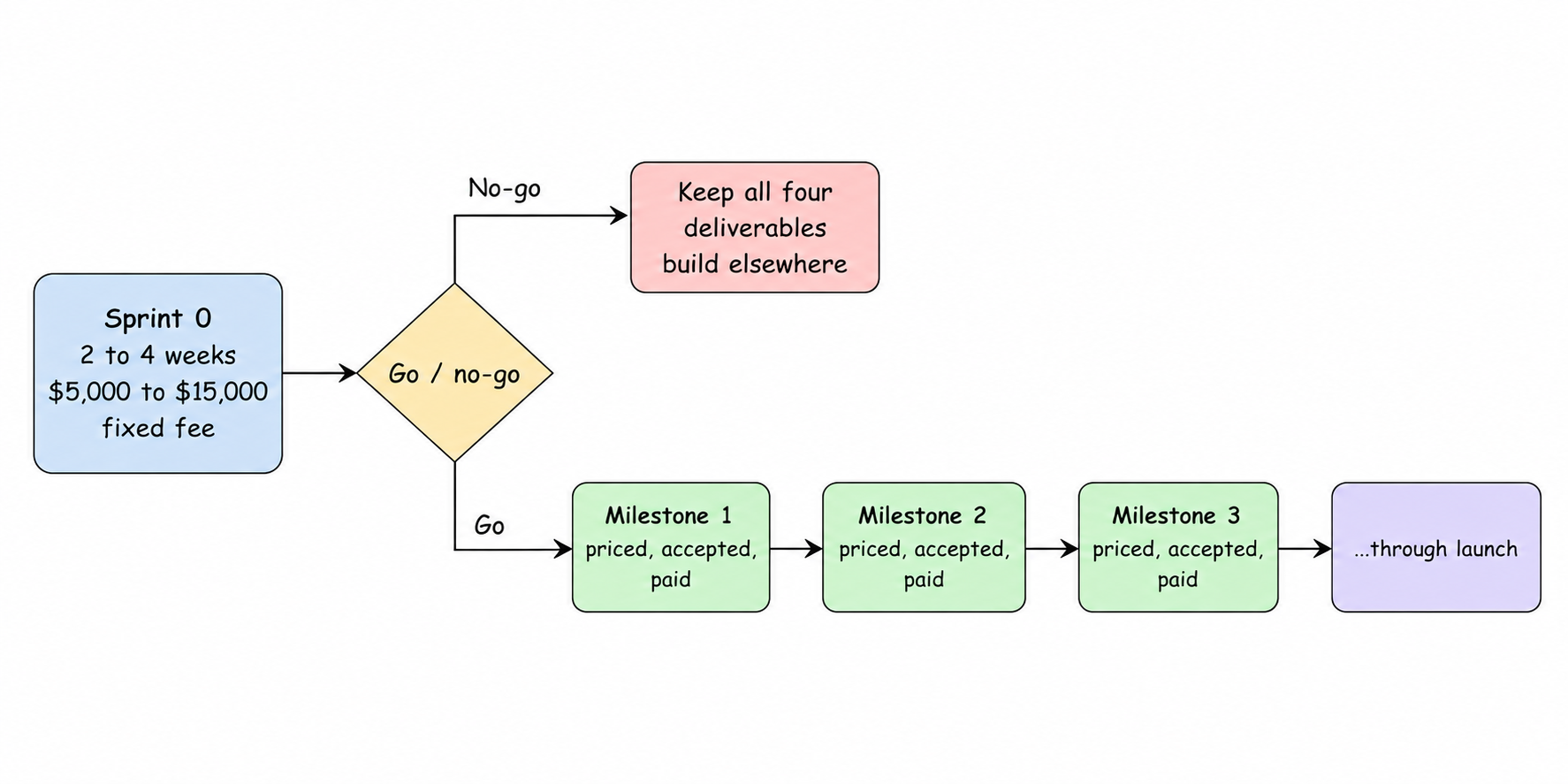
On our side this sequence is the front end of an AI product engineering build, though nothing about the four deliverables depends on that. Two things here protect you specifically.
It converts unknowns into a priced plan before any large commitment. Five firms quote five different numbers for the same brief because each one guessed differently about the parts nobody has examined yet. A discovery sprint replaces the guess with a plan, and the milestone prices come out of engineering work rather than a sales call.
Portability keeps the leverage on your side. Ask any firm what you walk away with if you stop after the sprint, and treat a thin answer as a sign you are paying a deposit rather than buying a plan.
Step-by-Step: From Idea to Launched App
The steps to build an app are the same on either path. Only who does them changes.
1. Validate the idea. Talk to ten people who have the problem. Ask what they do about it today and what that costs them. If nobody has a workaround, you may not have a problem worth solving.
2. Define the core workflows. Write the three to five journeys the app must support as "user does X to get Y." This is the highest-leverage hour in the whole process, and everything downstream gets built against it.
3. Choose your path. Run the flowchart above. Stakes, integrations and your available time decide this, not how technical you are.
4. Design before you build. Sketch the core screens and settle the main flows. Changing a screen in Figma costs minutes, changing it after it is built costs days, and changing it after launch costs a release.
If you want the screens in front of you before the design work starts, prototyping the product in Claude Design gets you a clickable version in an afternoon, and the same guide covers what that prototype leaves undecided.
5. Build in increments. Whether that means your own weekends or a firm's milestones, ship something testable every week or two. Long stretches without a working build are where projects quietly go wrong.
6. Test with real users, early. Not your team and not your investors. Five actual target users on a half-finished version will tell you more than fifty on a polished one, because they will still tell you the truth.
7. Launch narrow. One user segment, one workflow, one platform. Launching broad multiplies the surface area of everything that can break at the moment you are least equipped to handle it.
8. Iterate against your 90-day metric. You wrote it in the checklist. Let it decide what gets built next, rather than whoever asked most recently.
That is how to build an app from scratch on either path. The path changes who writes the code, not the order of the work.
What It Costs and How Long It Takes
On the DIY path your costs are tool subscriptions and your own hours, which means the real cost is the hours. Budget for maintenance while you are at it, because that bill starts the day you launch and never stops.
With a firm the sequence sets the numbers rather than a first call. Sprint 0 runs $5,000 to $15,000 over 2 to 4 weeks, and every milestone price in the build comes out of that sprint.
Anyone quoting a total before that work happens is guessing, because a single-workflow tool and a multi-role platform with payments and a CRM integration are not the same product. For the wider budget bands see our app cost guide, and for how the schedule usually breaks down, the mobile app development timeline.
Final Thoughts
Two paths are genuinely viable in 2026, and the right one depends on your stakes, your integrations and your time rather than your technical background. The checklist is the preparation that makes either path go faster, and it is worth doing even if you never hire anyone.
If you do engage a firm, a short fixed-fee discovery sprint followed by milestone billing is the structure that keeps cost visible and leverage yours.
If you want a priced plan for your own app before committing to a build, that is what Sprint 0 is for. Talk to us and you get the fee and the calendar window on the call, with the deliverables yours whichever way you decide afterwards.
Frequently Asked Questions
Can I create an app with no coding experience/knowledge?
Yes, through one of two ways. Non-technical people can build an application using AI-assisted tools while a dev firm manages anything with users, payments and data processing. The problem with the no-code method is that one may come across an application that does everything right but has no guarantee about its safety.
Can AI build an app for me?
For prototypes and simple workflow apps, largely yes. For production apps, not on its own. Human engineering is still needed for authentication, data modeling, integrations and maintenance, because AI reliably produces code that runs and much less reliably produces code that is secure.
What is the cost to build an app?
The range is wide enough that any single figure misleads, since complexity and integrations drive cost more than feature count does. Our app cost guide covers the bands. A Sprint 0 at $5,000 to $15,000 over 2 to 4 weeks produces a real number for your specific app, priced milestone by milestone.
How long does it take to build an app?
A simple DIY build can take days to weeks. A production app built by a firm typically takes months, driven by integrations and the number of user types it serves, and our timeline guide covers the usual shape. A Sprint 0 of 2 to 4 weeks produces the actual schedule for your build.
What should I prepare before hiring an app development company?
If you are asking "how to build an app for my business", start here. Bring a problem statement and target user, three to five core workflows, a must-have versus later split, your required integrations, an honest budget range, any real deadline, and your 90-day success metric. Discovery produces the full specification, so you do not need to write one.