Production Readiness Checklist for Vibe-Coded Apps
You built a vibe-coded app with Lovable, Base44, Bolt, Replit or Cursor. It works, people are signing up, but something makes you uneasy. You are not sure whether your AI-built app is ready to handle paying customers and their data.
The Publish button put your app online but did not make it production-ready.
This checklist is what a senior engineer uses before trusting that app with real users and real data. You don’t need a technical background to run most checks. Then you can decide what needs fixing and whether you need an engineer or a professional audit.
What "Production Ready" Means for a Vibe-Coded App
An app is production-ready when real users can rely on it with their data. It is secure by default, keeps data safe and recoverable, deploys and rolls back without manual edits, alerts someone when it breaks and has someone responsible for fixing it.
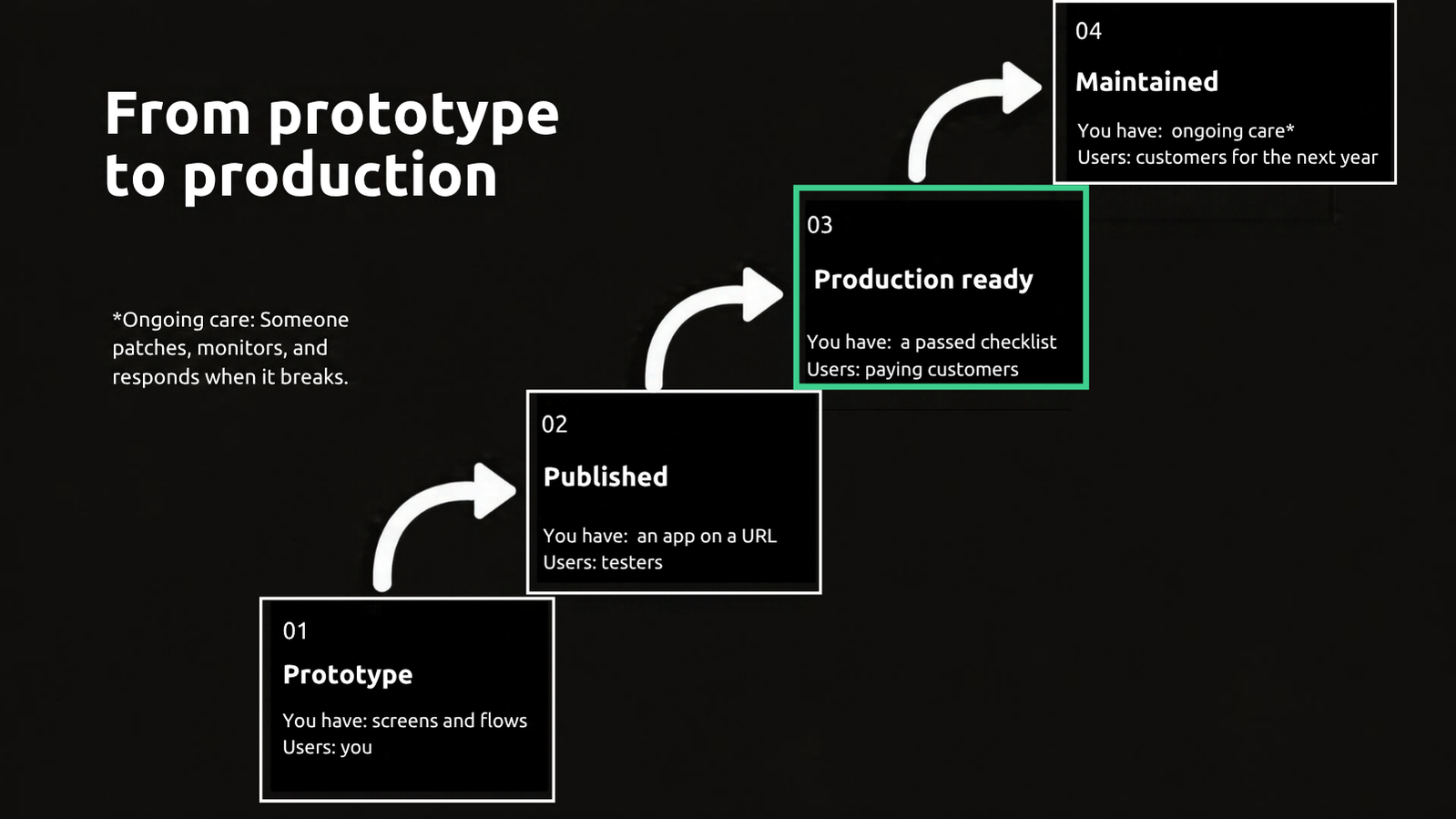
A clickable prototype shows the screen and how users move through it. A published app puts that experience on a URL where friends and early testers can find it.
Lovable, Base44, Bolt, Replit and Cursor compress the first two stages in an afternoon. Many builders stop at the Publish button, but going live doesn't make the app production ready or establish who will maintain it.
A maintained app has someone keeping these working: patching dependencies, monitoring problems and responding when something breaks. That is what supports customers over the next year and beyond.
Moving from prototype to production means passing the checklist below before trusting the app with paying customers and their data.
Is Lovable Secure? Is Base44 Safe? What the Platform Covers and What Your App Still Owns
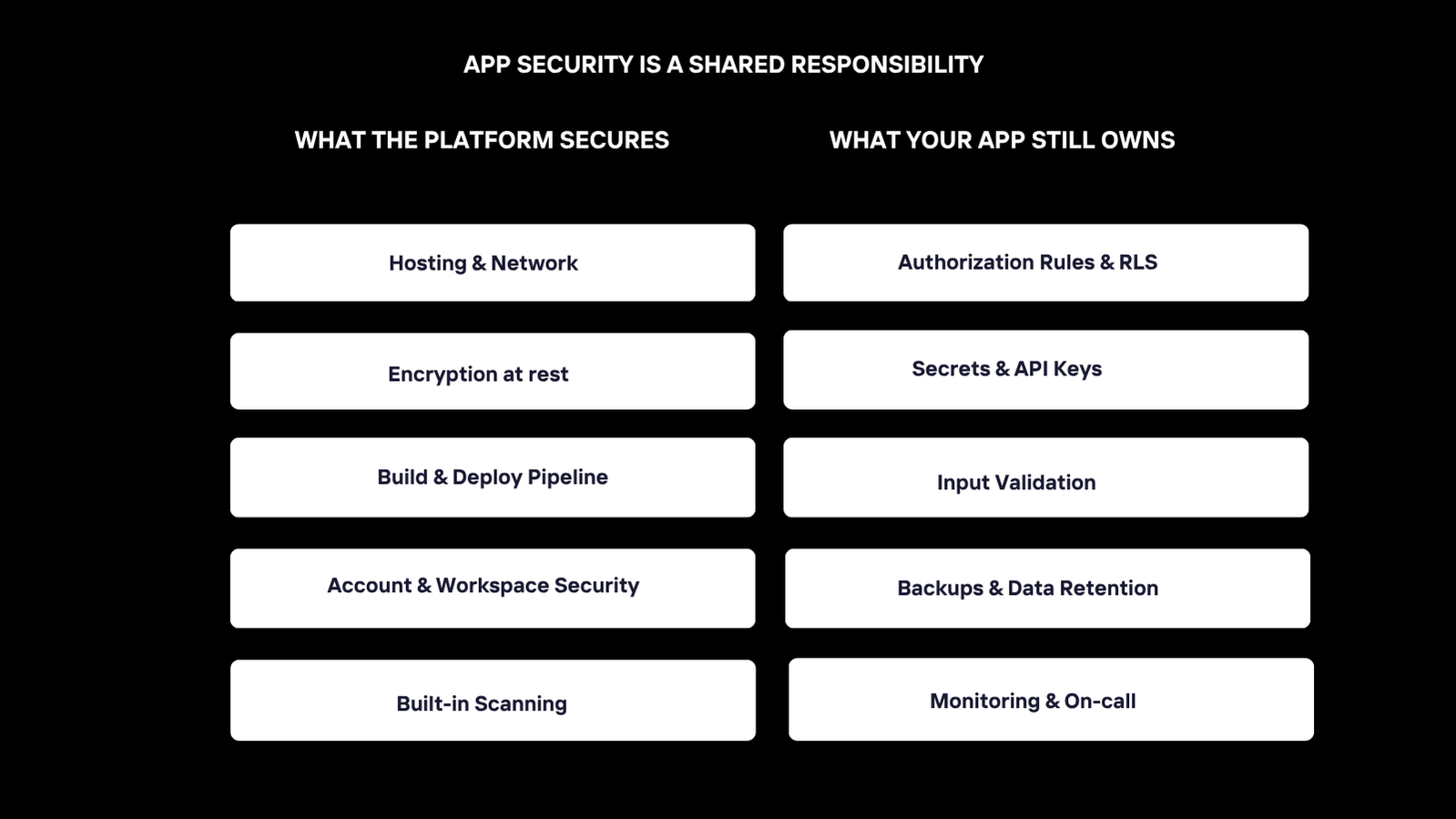
The platforms are secure. Lovable security guidelines are documented on its security page, trust center and security documentation. That doesn't automatically make your app secure. Base44 provides platform protections and reports SOC 2 Type II assurance, ISO 27001 certification, and independent penetration testing. You are responsible for your app's security settings.
There is a shared responsibility. The platform provides hosting, network protection, encryption at rest, build and deployment pipeline protection, account and workspace security, and built-in scanning. Your app owns authorization rules and row-level security (RLS), secrets and API keys, input validation, backups, data retention, monitoring and on-call. That means checking who can read each record, what credentials reach the browser, how the app handles bad input, if data can be recovered, and who responds to failures.
Public records show why these checks matter. In his May 29, 2025 disclosure, researcher Matt Palmer reported inadequate RLS across 170 Lovable projects using Supabase. His issue received the CVE-2025-48757 identifier. Readers researching a Lovable breach should distinguish this reported vulnerability from evidence of an actual data breach.
Imperva’s August 27, 2025 research described flaws in Base44, including stored cross-site scripting that could enable account takeover. Imperva reported that Base44 implemented fixes following the disclosure.
As of September 2026, Lovable provides built-in security scans and a per-project Security view. Its Security best practices for Lovable apps cover frontend security, server-side Edge Functions, RLS, authentication and workspace protection. Base44’s security overview explains its controls and the settings builders must review.
Run the built-in scans before starting the checklist. Treat the scans as a first pass, then test authorization across users and roles. Check for private credentials in the frontend, and verify that the server rejects invalid input. Scanners check these areas, but a clean result doesn't prove every rule matches your app’s intended behavior.
For developer-level details, see Leanware’s guide to vibe coding security risks.
The Production Readiness Checklist for Vibe-Coded Apps
This production readiness checklist follows the order a senior engineer uses to review an unfamiliar codebase: Security -> Architecture -> Data -> Tests -> Operations. Each item explains how to check your app inside the tool, exported code or hosting terminal. Compare your results with the pass criteria and mark anything you cannot verify as unresolved.
Check | How to verify it yourself | What a pass looks like | If it fails |
|---|---|---|---|
Security: data access | Create two test accounts. Check whether either can open or change the other’s private records, including through direct requests. | Authorization rules and RLS block access to another user’s private data. | Fix now |
Security: private credentials | Run the security scan. Search exported code, repository history and browser network requests for your private keys and tokens. | Private credentials are on the server. Public identifiers do not grant privileged access. | Fix now |
Security: input validation | In a test environment, submit missing fields, invalid values and requests that bypass form controls. | The server rejects invalid input without changing data or revealing internal details. | Fix now |
Security: dependencies | Run the available dependency scan and review its findings. | No known-vulnerable packages remain unresolved. | Fix now if attackers could use the weakness to access or harm your app or its data. Otherwise, fix before the next 100 users. |
Data: record structure | Inspect each user-data table in the database console. | Records have a primary key, timestamps and a user or organization ownership field. | Fix before the next 100 users and before the next database structure change. |
Data: tracked changes | Check the repository for migration files that are recording database structure changes. | Changes are versioned and can be applied consistently without manual dashboard edits. | Fix now |
Data: integration failures | In a test environment, simulate a payment, email or AI service failure. | Users get a clear status; retries do not duplicate charges or lose records. | Fix now |
Data: AI spending controls | Test spending limits. Review provider billing settings and app usage. | A hard cap stops further spending, and an alert reaches the owner. | Fix now |
Tests: critical journeys | Run automated tests for sign-up, login, data export, payment and account deletion, if supported. | Each applicable journey has a passing test that checks its result. | Fix now |
Tests: pre-published checks | Run the written manual checklist before publishing. | The person publishing the app runs the same checks each time and records the results. | Fix before the next 100 users, and before the next publish. |
Code Quality: duplication | Review the code-analysis report or ask the tool to identify duplicated and unused code. | The app owner records cleanup tasks separately from security and functionality blockers. | Note it |
Operations: staging | Check that the test environment has separate credentials and representative test data. | Changes can be tested without affecting customers, live records or real payments. | Fix now |
Operations: rollback | On staging, deploy a change and practice restoring the previous working version. | The app can be rolled back within minutes without manual code edits. | Fix now |
Operations: backups | Inspect the database backup schedule and recent successful backup logs. | Automated backups run successfully at an interval appropriate to the app’s data. | Fix now |
Operations: restore | Restore a backup into an isolated test database and check its contents. | Records are recoverable, and the restored app can use them. | Fix now if critical data recovery is unverified, or fix before the next 100 users. |
Operations: alerts | Trigger a test application error and an uptime alert. | The test application error and uptime alert reach the responsible person’s phone. | Fix now |
Operations: logs | Check retention settings and trace a test failure through stored logs. | Logs are available long enough to investigate customer reports without exposing secrets. | Fix now if missing logs prevent security, payment, or data-loss investigation. Or fix before the next 100 users. |
Operations: incident owner | Find the written response plan for an AI API or payment-provider outage. | Someone knows how to investigate, recover and update affected customers. | Fix now |
- Fix now means resolve the issue before relying on the app for real users and data.
- Fix before the next 100 users means schedule the improvement before expanding usage.
- Note it means record a cleanup task that does not currently block safe operation.
Note: Treat missing logs as fix now if they prevent you from investigating security, payment or data-loss incidents.
Security: Who Can See What, and Where the Keys Live
Every table holding user data needs RLS or equivalent authorization rules. Create a private record with one test account, then sign in with another test account and try to open that record.
Repeat across roles. Hiding a button does not enforce permissions.
Use your editor’s Find in Files to search exported code for private API keys, database passwords, service tokens and repository history. Open browser development tools, select Network, reload the app and inspect request URLs, headers and responses for private credentials. Public identifiers are not automatically leaked. Rotate exposed secrets. In a test environment, submit invalid or missing values to each form and endpoint. The server must reject them even when you bypass the browser checks. Run the dependency scan and resolve known-vulnerable packages.
Start with the vendor’s security scanner, then manually test what each user role can access and check whether private credentials were pasted into prompts. A clean scan does not prove your app is secure.
Architecture and Data: What the App Does to Your Data Over Time
An app can work today but lose or corrupt data months later if its AI-generated database structure assumes everything succeeds, changes happen manually, and integrations only handle demo conditions. Every user-data table needs a primary key, timestamps and ownership. An expense record, for example, needs a unique ID, creation and update times, and an owner ID.
Save database changes as migration files in your repository. For example, use a migration to add an expense-status field with pending and approved values, so the same change can run in staging and production without manual dashboard edits. Assign a failure path to every integration. If Stripe, email or an AI API is unavailable or slow, preserve the submission and show a pending or retry message rather than claiming success.
Set an AI spending cap and an alert. An intake form calling a model on every keystroke can generate charges overnight.
Tests and Code Quality: What Is Actually Verified
If your app does not have automated tests, start with the areas that handle money or user data.
Sign-up, login, payment, account deletion and data export need at least one automated test confirming the expected result. Keep a written list of manual checks to run before you publish.
Duplicated and unused code may not block launch, but it makes later changes slower and riskier. As a result, the review’s fix list should separate failures that threaten users or data from cleanup that can wait.
Operations: Where It Runs, How It Deploys, and Who Finds Out When It Breaks
Does Lovable host websites? Lovable Hosting publishes your app on a Lovable.app address, and you can connect a custom domain. Lovable’s deployment and hosting documentation explains exporting code to a host you manage. For staging vs. production, production is the URL customers use with real data.
What is a staging environment? A separate copy matching production, where you test changes using realistic test data. An editor preview alone doesn't provide that separation or testing coverage.
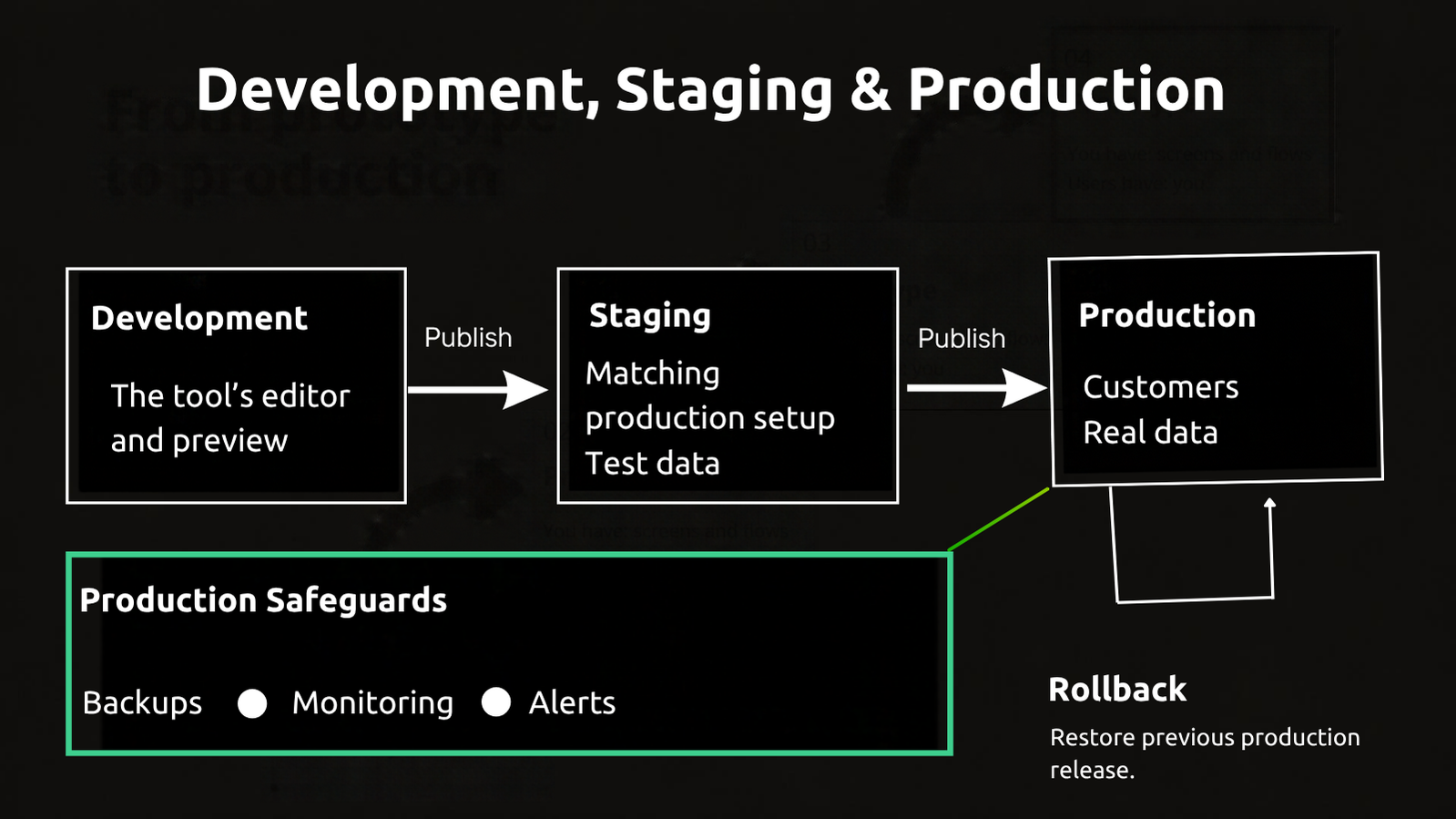
Practice rolling back a bad publish within minutes. Enable automated database backups and complete a test restore. Send error monitoring and uptime alerts to the responsible person’s phone, and keep logs long enough to investigate complaints. Write down who responds when the AI API or payment provider fails at 2:00 a.m., how they recover service and what customers are told.
Who Owns the Code and Where It Lives: GitHub, Export, Hosting and Your Domain
Keep the repository in a GitHub account or organization you control rather than a freelancer’s or co-founder’s personal account. Register the domain in the company’s name. Put hosting and database accounts under company billing, add a second owner, and store integration API keys in a secure company vault.
As of September 2026, Lovable export code options include GitHub sync and code-editor downloads on paid plans. For instructions on how to connect Lovable to GitHub, follow its connection guide and select a repository owner you control. Your Lovable custom domain should also remain under company control.
Base44’s eject command downloads the code and creates a separate Base44-hosted backend. It copies the database structure, but not existing records.
Bolt supports project downloads, plus GitHub integration and deployment through Bolt hosting, Netlify or other hosts. Replit supports pushing code to GitHub and publishing through its hosting service. Before moving either app, check whether its database and connected services will work on the new host.
These ownership checks make a handover possible. An engineer cannot audit or take over an app they cannot read or access.
After the Checklist: Fix It Yourself, Bring In One Engineer, or Have It Audited
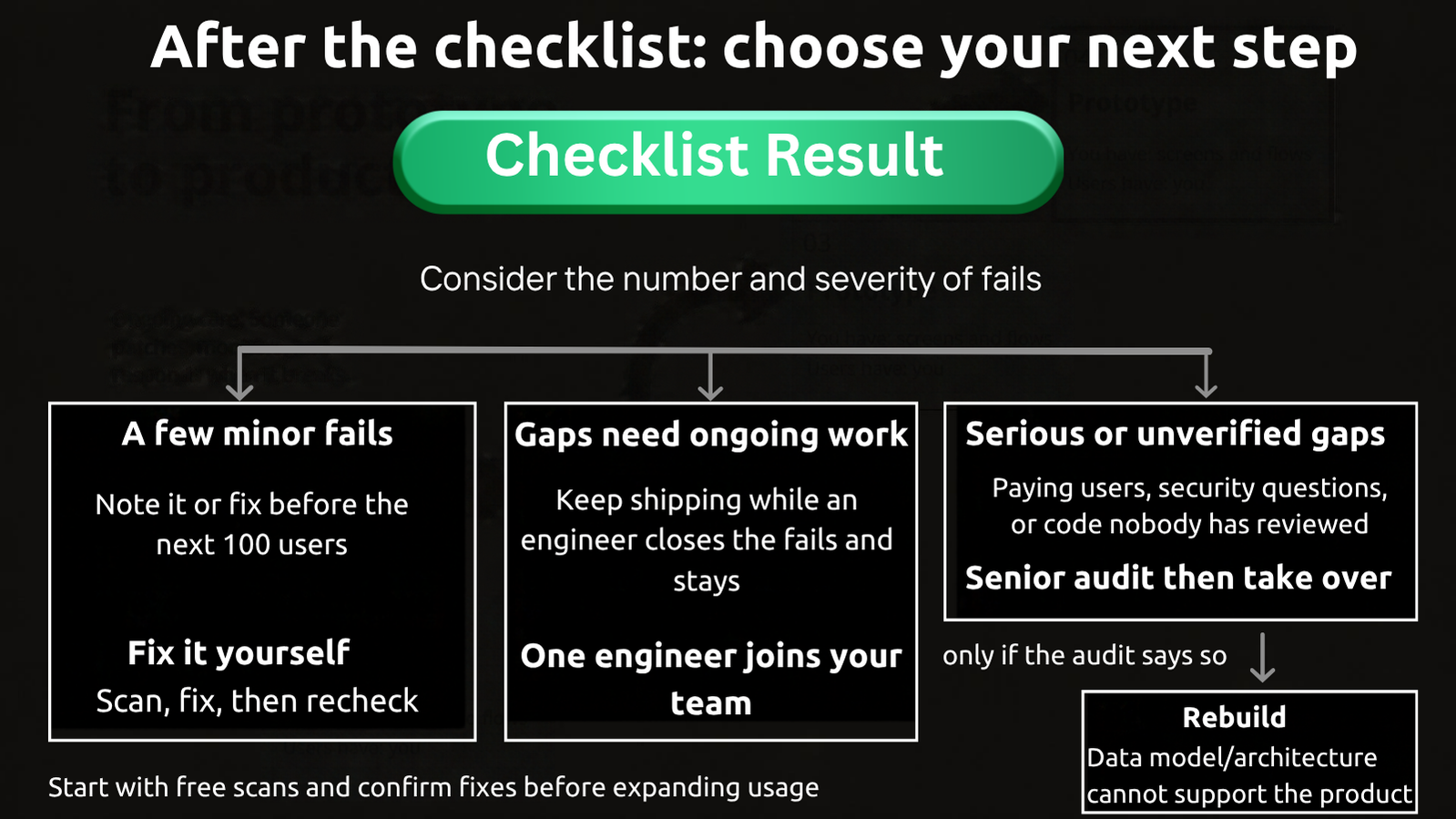
Fix it yourself: If your failed checks fall under note it or fix before the next 100 users, use the checklist as your to-do list. Start with the vendor’s scanner and the AI tools, then repeat each check to confirm the fix. Follow vibe coding best practices as you work.
Bring in one engineer: If you want to keep shipping, bring a senior engineer into your repository, stand-ups and code reviews to close the gaps. Leanware’s staff augmentation provides senior engineers you interview and place on your team at a monthly rate that starts at about $6,000 a month for one full-time engineer, with time off not billed.
Have it audited: Choose this when you have paying users, an investor or enterprise customer asking about security, or code nobody on your side has read. Run the free vendor and automated code scanners first. Before anyone takes over, have a senior engineer examine the code, configuration and deployment pipeline.
Leanware offers a fixed-fee code audit of $4,000 to $12,000, one to two weeks, one senior engineer, covering security review; architecture and data-model review; test coverage and code quality; operations readiness; a prioritized fix list and a takeover quote. It covers apps built with Lovable, Replit, Bolt, or Cursor, and inherited from a previous team.
Most vibe-coded apps do not need to be rebuilt. They need the risky parts fixed and someone watching them. Rebuild only when the audit finds that the data model or architecture cannot support the product. In that case, moving from vibe coding to engineering requires a scoped build. Leanware’s software product development services include MVP development, and you scope it first.
Who Maintains the App After Launch
Maintenance means updating dependencies as platforms change, patching next month’s scanner findings, watching alerts, responding to incidents and making small changes customers request. Decide who maintains your Lovable app before launch.
You can maintain it yourself with the tool while the app is small and handles no money. As support needs grow, hire a Lovable developer on a monthly retainer covering on-call duties and incident response. Having your app audited and taken over starts with an audit and a takeover quote for ongoing maintenance and incident response.
If nobody owns the roadmap or manages vendors, a fractional CTO can serve as the named technical owner one or three days a week.
The retainer is the step most founders skip, and the one that decides whether the app is still running in a year.
Final Thoughts
Building with an AI tool helped you find out whether anyone wanted the app. Production readiness asks a different question: can people rely on it with their data? Use the checklist to identify the gaps, or send Leanware your app’s URL and how you built it for a read on what it needs before the next hundred users.
Frequently Asked Questions
What does production ready mean for a vibe-coded app?
A vibe-coded app is production-ready when it is secure by default, protects and can recover user data, deploys and rolls back without manual edits, and has alerts and someone responsible for fixing failures. The four stages are prototype, published, production ready and maintained.
Is Lovable secure?
As of September 2026, Lovable publishes its platform security controls, but they don't automatically secure your app. Run Lovable’s built-in scan first, then verify authorization rules, private credentials in the frontend and input validation.
Is Base44 safe?
Base44 states SOC 2 Type II compliance and ISO 27001 certification. Imperva disclosed critical platform flaws in August 2025 that Base44 fixed, but builders remain responsible for their app’s authorization rules, credentials and input validation.
Does Lovable host my app, and can I use my own domain?
Yes. Lovable hosts published apps on a lovable.app address and supports custom domains. You can also export your code or sync it to GitHub to deploy on your own hosting.
What is the difference between staging and production?
Production is the live app customers use with real data. Staging is a separate environment that matches production, where you test changes safely. The tool’s preview alone isn't staging because it doesn't create that separation or matching setup.
How much does it cost to have a vibe-coded app audited?
Start with a free first pass using the vendor’s scanner. Leanware’s senior-engineer audit is a fixed fee of $4,000 to $12,000 over one to two weeks, with a single AI-built web app usually in the lower half of the range.
Who maintains a Lovable or Base44 app after launch?
You can maintain it yourself, hire an engineer on a monthly retainer with on-call support, or appoint a part-time technical owner. The audit’s takeover quote defines the retainer option for ongoing maintenance and incident response.
Sources
- Compare Vibe Coding Tools
- Vibe Coding Security Risks
- Lovable Security
- Lovable Security View
- How to Connect Lovable to GitHub
- Security Best Practices for Lovable Apps
- Base44 Security
- Base44 Security Overview
- Statement on CVE-2025-48757
- Best Practices for Supabase
- Leanware’s Staff Augmentation
- Leanware’s Code Audit
- Leanware: Vibe Coding vs. Traditional Coding
- Leanware: Software Product Development
- Leanware: MVP Development
- Leanware: Sprint 0
- Leanware: Fractional CTO
- Leanware Contact