Human in the Loop vs On the Loop for AI Agents
Your team handles incoming orders manually. You have seen an AI agent workflow demo process a complete submission, but who handles missing fields or conflicting instructions? Choosing human in the loop for approvals or human on the loop for monitoring is a design decision made per step, not a policy slogan.
This guide explains the decision rule and routing tiers a senior engineer uses to decide what runs automatically, what needs approval and what someone monitors. It also shows when a plain workflow is enough, and you do not need an agent.
We will follow a document intake process from arrival through validation, record update, and exceptions. The goal is to place human judgment where its value justifies time and cost.
What Human in the Loop Means for an AI Agent (and How It Differs From On the Loop and Out of the Loop)
Human in the loop means the AI agent stops and waits for a person to review, approve or correct a decision before it takes action.
Human on the loop means the AI agent acts on its own while a person monitors the outcomes and can intervene or roll back an action.
Human out of the loop, or straight-through processing, means the agent acts without anyone reviewing the case; people monitor aggregate metrics instead.
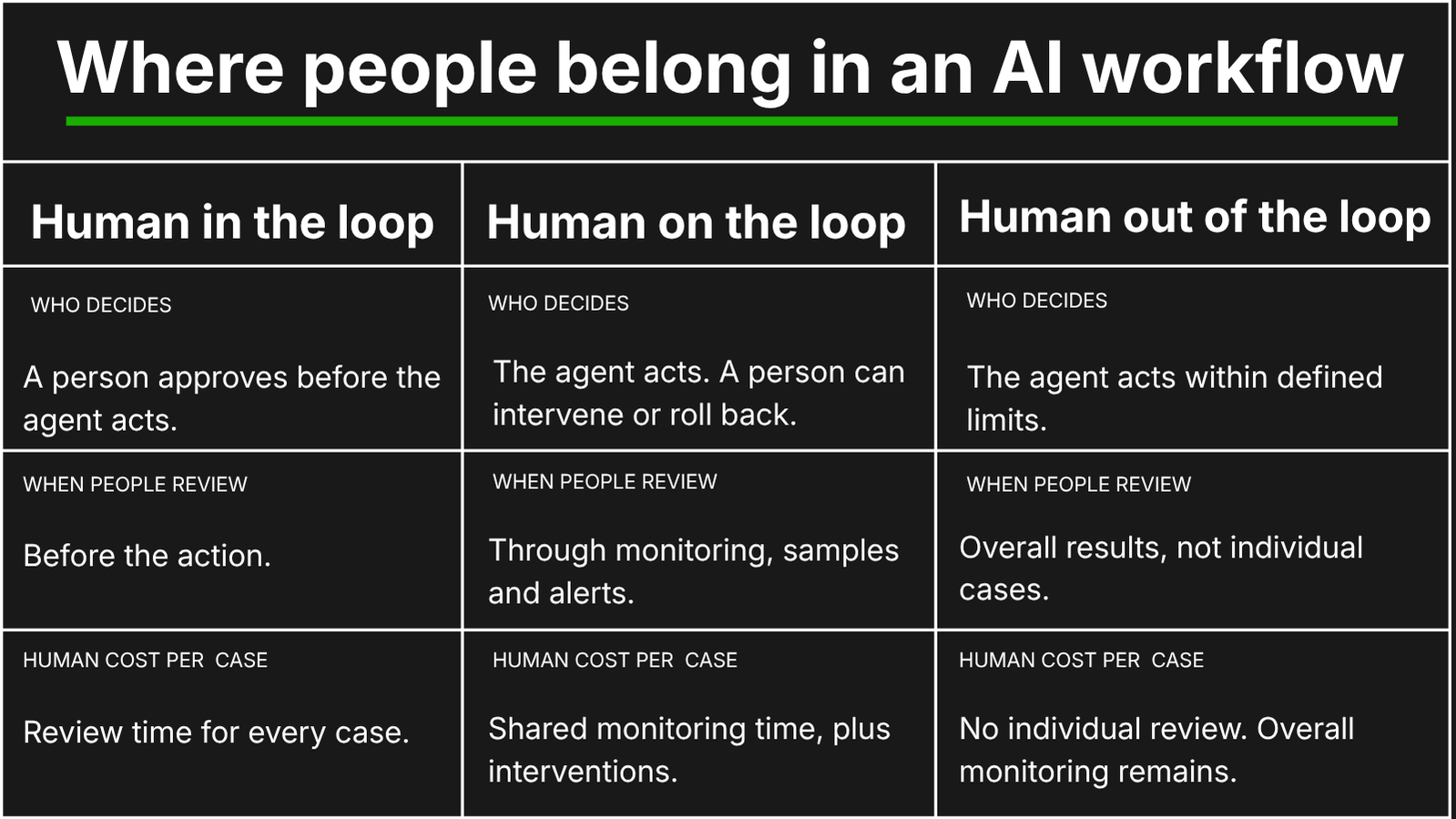
IBM defines human in the loop broadly as human participation in an automated system’s operation, supervision, or decisions. The term also has an older machine-learning meaning: people label and correct training data to improve a model. This post uses the operations meaning: deciding where a person reviews or controls an action in a live workflow.
These modes are not a maturity ladder that every workflow must climb toward full autonomy. A production agent can use all three within the same workflow: route incoming documents automatically, update provisional records under monitoring, and wait for approval before releasing a costly shipment.
Human in the Loop vs Human on the Loop: Which Mode for Which Decision
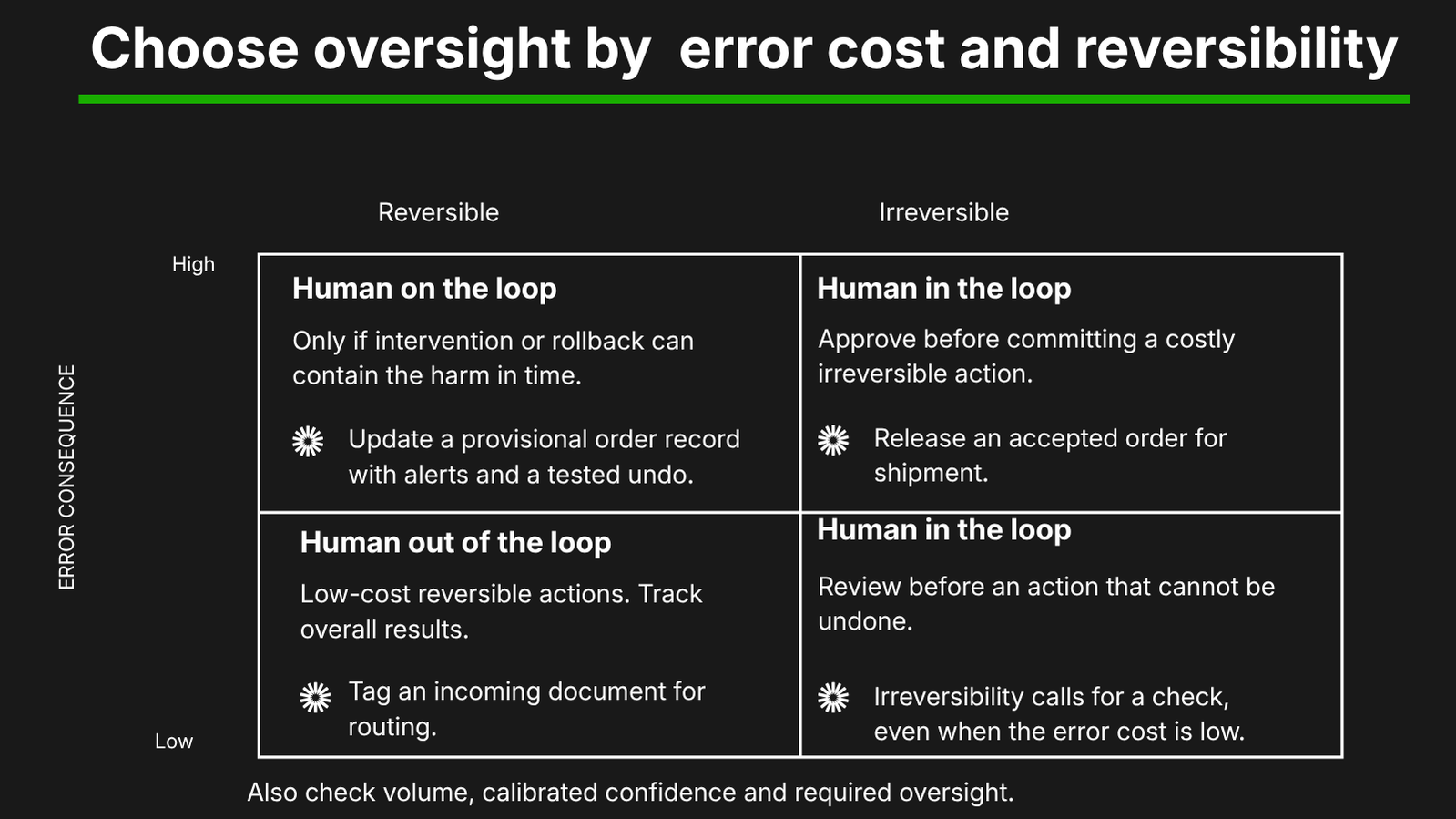
Choose the oversight mode for each step by asking these four questions. What does an error cost? Can the action be reversed before it affects a customer or reaches a regulator? How many cases arrive each day? How confident is the agent about this particular case?
Start with the consequence of getting it wrong. Routing a document to the wrong internal queue is different from releasing an expensive shipment to the wrong address. If the error would be costly or the action cannot be undone, require approval before it happens. Monitoring is appropriate only when someone can detect the problem and intervene before harm occurs.
Next, consider volume and confidence together. A reviewer might handle 50 approvals a day, depending on complexity; 5,000 requires a different process. High volume does not make a risky decision safe to automate. It makes reliable routing and selective review essential. Use a calibrated confidence score checked against actual outcomes on sample cases, rather than accepting the agent’s statement that it feels certain.
A fifth question applies where regulations require human oversight. Article 14 of the EU AI Act requires effective human oversight measures for high-risk AI systems, proportionate to their risks, autonomy and context. It does not require a person to approve every action. Routine document routing does not become high-risk because an SMB uses AI. Whether these rules apply depends on what the system does and how it is used, not the company's size. In the United States, check the industry-specific requirements and state laws that apply to the decision being automated.
Consider running one document intake workflow. An order arrives by email, portal or electronic data interchange (EDI). The system extracts the information, checks it against business rules, updates the system of record and routes exceptions. Each step can use a different oversight mode.
Mode | Use it when | Who decides | Cost per case | Example step |
|---|---|---|---|---|
Human in the loop | Error costs are high, the action is irreversible, confidence is low, or applicable rules require approval. Low volumes make individual review easier to support. | A person reviews, approves or corrects the proposed decision before the AI agent acts. | Review time for every case sent to this step, plus processing costs. | Approve an order with conflicting delivery details before releasing a costly shipment. |
Human on the loop | Actions are reversible before harm occurs, volume is moderate, and someone monitors samples and alerts with time to intervene. | The AI agent acts; a person can intervene or roll back. | Processing costs plus shared monitoring time and occasional intervention. | Update a provisional order record, with sampled checks, alerts and a tested undo process. |
Human out of the loop | Error costs are low, volume is high and calibrated confidence is high. Performance is measured in aggregate. | The AI agent acts within defined limits without a human reviewing each case. | Processing costs plus aggregate monitoring, with no routine review time per case. | Tag a familiar incoming document and route it to the appropriate internal queue. |
Which decisions need a person is one of the questions a baseline audit answers before anything is built. Leanware’s AI Readiness Assessment takes two to three weeks, is led by one senior engineer and uses a fixed fee scoped on the intro call. It ends with a baseline audit, a ranked opportunity map and an implementation roadmap.
Not Every Step Needs an Agent: Six Tiers From Rules to People
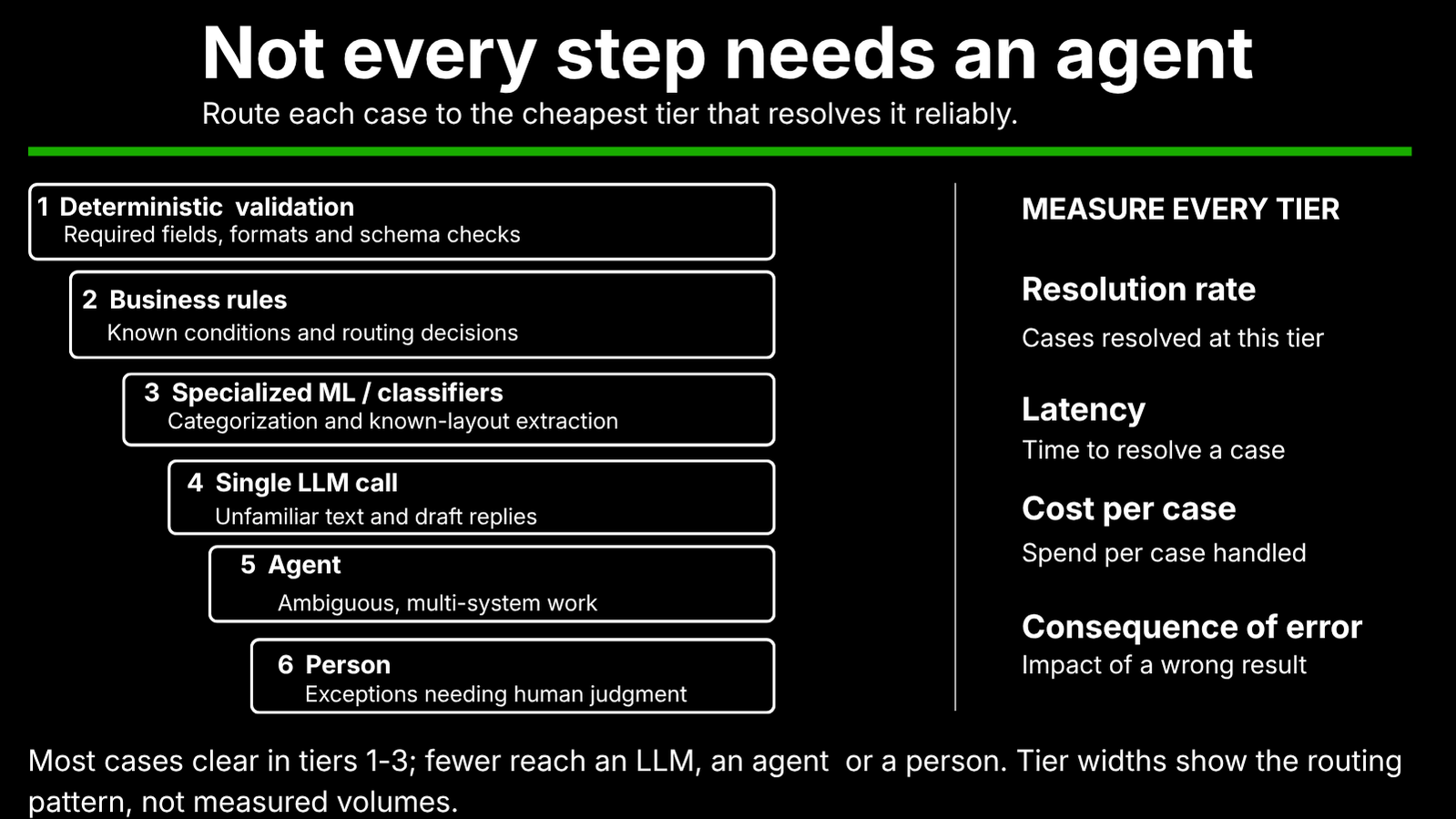
An agent is one option in a routing stack. Start with the simplest method that can handle each step reliably, then add complexity where the task requires it. In document intake, checking a required field should not require the same technology as investigating conflicting instructions across several systems.
The distinction between agents vs workflows is about who controls the next step. In Building effective agents, Anthropic distinguishes workflows that follow predefined code paths from agents that choose their next actions and tools dynamically. It recommends starting with simple solutions because agent flexibility adds cost and latency.
1. Deterministic validation. Check the document’s schema, required fields and formats. Does the order include a delivery address? Is the date in an accepted format? These checks run almost instantly at negligible processing cost, without a model call. A check like this is never wrong about what it checks, but a correctly formatted address can still be the wrong address.
2. Business rules. Apply known conditions: if the order names this carrier and this destination state, send it to this queue. Rules are inexpensive to run and easy to audit because the routing decision follows an explicit condition. They need maintenance when carrier coverage, customer agreements or operating procedures change.
3. Specialized ML or classifiers. Use a trained model to categorize documents, route submissions, or extract information from familiar layouts. When deployed, a focused model can process these tasks quickly at low cost per case. Training data, evaluation and updates are part of its cost, especially when incoming document formats change.
4. A single LLM call. Use one model call to interpret an unfamiliar document or draft a request for missing information. This allows flexibility without giving the model control of an entire process. A short task may cost only a few cents, depending on the model and input length, but you still need to validate its output. The practical distinction between deterministic vs probabilistic AI is that a fixed check applies a specific condition, while a model-generated answer can be plausible but wrong.
5. An AI agent. Use an AI agent when resolving the case requires several steps and the choice of tools depends on what it discovers. For example, it might compare an order with customer instructions, check carrier availability and retrieve an earlier agreement. This can handle ambiguity that a fixed path cannot, but repeated model calls and tool use add time, cost and opportunities for error. Reserve this tier for cases the lower tiers cannot resolve reliably. Design agentic workflows with the necessary orchestration across systems. Integrating the agent with the systems of record is its own piece of the build, covered under AI integration and consulting.
6. A person for exceptions. Route unresolved conflicts, low-confidence results and decisions requiring human judgment to a named reviewer. The person receives the document, relevant context and proposed action, then records the decision. This tier adds staff time and queue delays, so use it where judgment or approval justifies the cost. Required approvals still apply even when a lower tier can produce an answer.
Route each case to the cheapest tier that resolves it reliably. Measure every tier using the same four numbers: resolution rate, latency, cost per case, and consequence of an error. A fast, inexpensive tier provides little value if its mistakes create costly downstream work.
The intended volume pattern narrows towards the bottom: most cases clear in the first three tiers, a minority reach the LLM, a small fraction need an agent, and a smaller fraction reach a person. Treat this as a design goal to test against your own intake data, rather than an assumed performance benchmark.
When deciding when to use AI agents, compare the total operating cost with simpler automation. Framed as AI agents vs automation, it is a question of cost per case at the volume you run. A predictable trigger-and-action process may fit a problem better suited to Zapier or Make. Leanware’s platform rule states: “A platform agency is the right choice under roughly $1,500 a month of total automation spend, or for single-system workflows.” Leanware positions an engineered AI agent as cheaper to own above that spending level, or when exceptions and context across multiple systems drive the work. This is its service-selection guideline; your workflows’ measured costs determine the business case.
Human in the Loop Automation in Practice: Designing the Exception Path
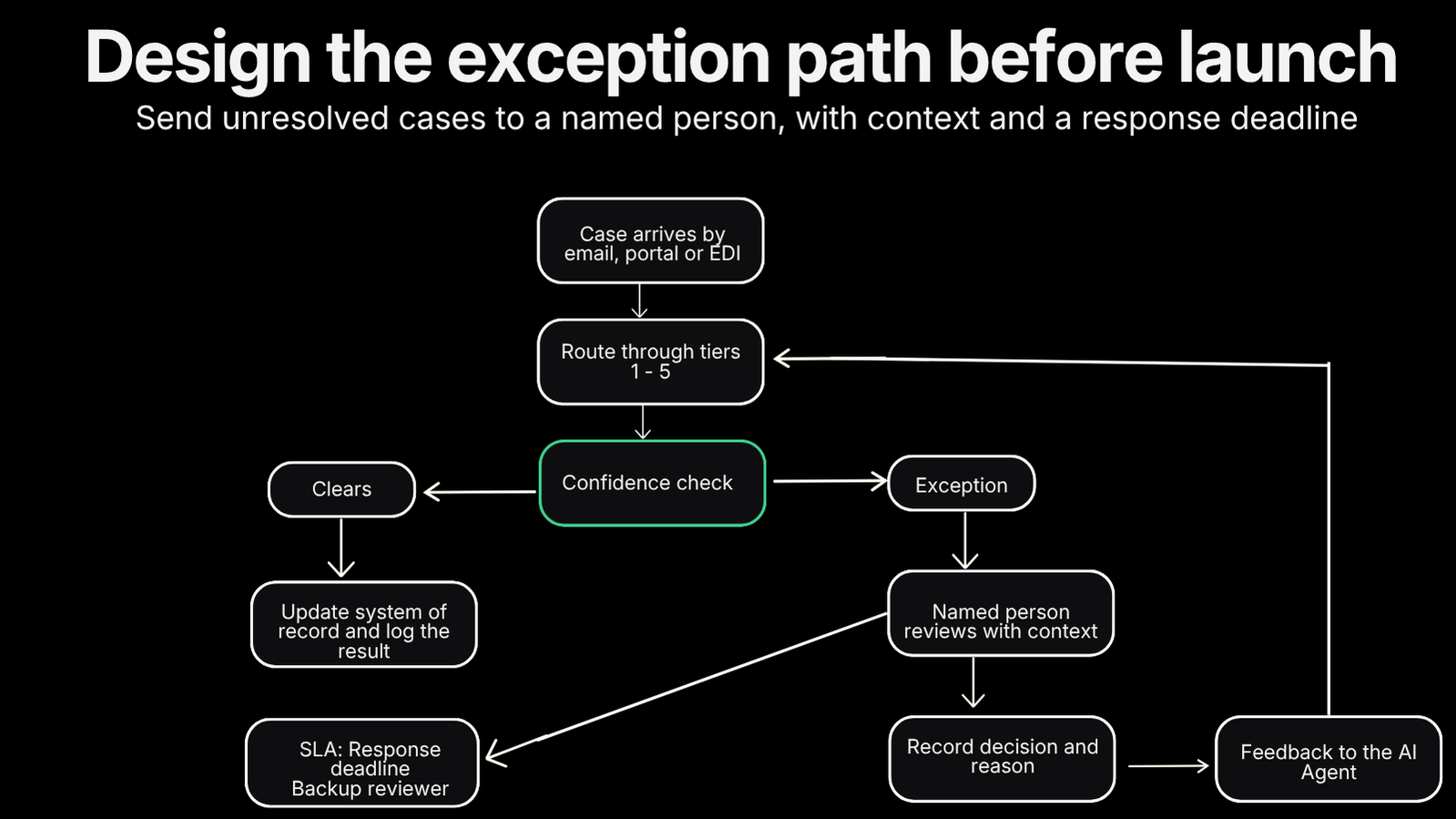
In a human in the loop workflow, an exception is a case the system cannot confidently resolve. This includes unfamiliar documents, conflicting rules, low confidence, or missing fields that existing rules cannot fill. In the document intake workflow, cases that pass the checks update the system of record and are logged. Exceptions go to a named reviewer with assigned responsibility, rather than being dropped into a shared inbox.
The reviewer receives the original document, extracted data, what the agent is unsure about and its proposed action. The reviewer records the decision and reason, then uses that feedback to improve rules, prompts, or retrieval so similar cases can clear next time. Set a response deadline through a service-level agreement (SLA), name a backup reviewer, and define what happens if neither responds. Track the exception rate and work to reduce recurring problems over the first weeks.
Human in the loop AI agents fail in two ways, so watch for both. First, review becomes a bottleneck. The AI agent processes cases faster than people can approve them, the queue grows, and the team feels pressure to bypass the check. Second, reviewers rubber-stamp suggestions without examining them. A 99% approve rate means the check is not a check; sample instead where risk allows, while keeping required approvals.
Platforms such as n8n, Make, and Zapier can support approval workflows that pause for a response, which may be enough for a simple, single-system process. The n8n versus Zapier comparison helps frame the platform choice. The review step still needs an owner, context, a deadline and a fallback.
Leanware’s Custom AI Agents service includes this exception path. Its guardrails define what the agent may do independently and what it must never do. Low confidence, unfamiliar documents and rule conflicts send cases to a named person with context attached, and recorded resolutions guide improvements. The senior engineers who scope and build the AI agent also run it in production. Builds take three to ten weeks from an Assessment-led proposal, with one setup fee and one monthly fee covering model APIs and hosting.
The Cost of a Human Step: Coverage Rate, Straight-Through Processing and Payback
The automation coverage rate, or straight-through rate, is the share of cases completed without human review. It drives the economics because each case requiring a person has labor cost. Adding a mandatory human step removes the affected cases from straight-through processing, even when the AI agent handles everything else. Lower coverage means less labor savings and, with other costs unchanged, a longer payback period.
Leanware’s AI ROI calculator provides these benchmarks:
3PL: typical automation coverage at steady state is 65 to 80% for order intake and 60 to 75% for onboarding, with EDI format variability as the primary constraint.
MGA submissions: a typical straight-through rate of 70 to 85% for clean ACORD submissions with all required fields and 50 to 65% for complex or incomplete submissions.
The calculator also describes a ramp: coverage in week one is below the steady-state estimate, reaching that level by day 60 to 90. Its projected savings therefore assume a level of automation that is not available immediately. The first 90 days require more human oversight than the model projects.
Budget the reviewer’s time for that ramp-up. In the document intake workflow, someone still needs to resolve unfamiliar formats, missing fields and conflicting instructions while the process improves. Track that workload alongside coverage so your staffing plan reflects actual demand. Plan for the exception rate to fall as you address recurring problems, rather than expecting it to be zero on day one.
Final Thoughts
The question is never human or agent. It is which step, which mode, and at what cost of error. Different steps in the same workflow need different levels of human involvement. Tell us about your workflow and where you think a person needs to stay involved, and we can help assess which steps an agent could handle on its own and which should remain under human review.
Frequently Asked Questions
What is human in the loop in AI?
Human in the loop means an AI agent waits for a person to review, approve or correct a decision before taking action. In machine learning, the term also describes people labeling and correcting training data.
What is the difference between human in the loop and human on the loop?
Human in the loop means the AI agent waits for a person before taking action; human on the loop means the AI agent acts while a person monitors and can intervene. Use in-the-loop review for costly or irreversible decisions, and on-the-loop monitoring when errors can be detected and corrected before harm happens.
When should an AI agent hand a decision to a person?
An AI agent should hand a decision to a person when confidence is low, input is unfamiliar, rules conflict, an action is irreversible or costly, or regulations require human review. Ask these four questions: What would an error cost? Can the action be reversed before harm happens? How many cases arrive each day? How confident is the agent on this case?
Do I need an AI agent or a workflow?
Use a workflow when the steps are predictable, and rules can define the path from input to output; use an AI agent when a case requires judgment and tool selection across systems. Leanware’s platform rule favors a platform agency below roughly $1,500 in monthly automation spending or for single-system workflows, and an engineered agent above that level or when exceptions and cross-system context drive the work.
What is human in the loop automation?
Human in the loop automation pauses at defined steps so a person can approve, correct, or take over. The system provides the context needed to review the case and records the person’s decision.
How much human review does an AI agent need in production?
Human reviews depend on the step. Leanware’s published automation coverage benchmarks are 65 to 80% for 3PL order intake, 60 to 75% for onboarding, 70 to 85% for clean ACORD submissions, 50 to 65% for complex or incomplete submissions, plus the 60 to 90-day ramp-up. Plan for more review during that ramp and a falling exception rate as recurring issues are resolved.
Is human oversight of AI required by law?
Yes, for certain uses. Article 14 of the EU AI Act requires human oversight measures for high-risk AI systems. Routine SMB back-office tasks generally fall outside those categories, but the system’s purpose determines whether the rules apply. US requirements vary by industry and state, so check with counsel about your specific workflow.